cancel
Showing results for 
Search instead for 
Did you mean: 

The Power BI Data Visualization World Championships is back! It's time to submit your entry. Live now!

Reply
michal089
Frequent Visitor

Custom visual - problem with dates.

Hi,


recently I've been trying to set up the custom visual that would display some dates. The point is: I am passing dates (e.g. 2018-01-01) and the visual gets the date that is earlier by 1 day ( 2017-12-31). Why is this happening and how to fix it ?


Some screenshots:


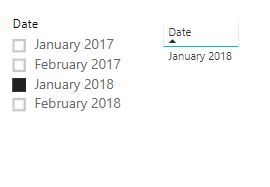
I'am filtering "Date" (in the table the value is correct):


filtering

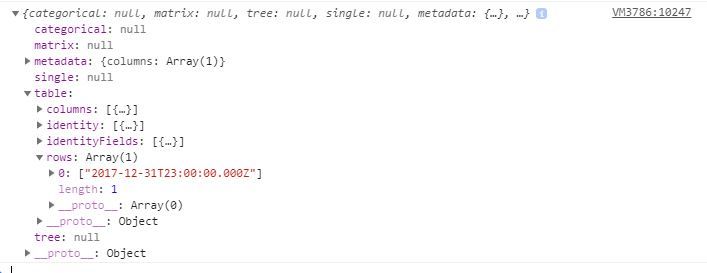
And that's what I get in the visual:

visual-input


Michał

1 ACCEPTED SOLUTION
v-viig
Community Champion
Community Champion

Most lileky dates are converted to local timezone but by default they are UTC.


Ignat Vilesov,

Software Engineer


Microsoft Power BI Custom Visuals

pbicvsupport@microsoft.com

View solution in original post

1 REPLY 1
v-viig
Community Champion
Community Champion

Most lileky dates are converted to local timezone but by default they are UTC.


Ignat Vilesov,

Software Engineer


Microsoft Power BI Custom Visuals

pbicvsupport@microsoft.com

Helpful resources

Announcements
December 2025 Power BI Update Carousel

Power BI Monthly Update - December 2025

Check out the December 2025 Power BI Holiday Recap!

FabCon Atlanta 2026 carousel

FabCon Atlanta 2026

Join us at FabCon Atlanta, March 16-20, for the ultimate Fabric, Power BI, AI and SQL community-led event. Save $200 with code FABCOMM.