cancel
Showing results for 
Search instead for 
Did you mean: 

Data Days is here! Join us now for 60+ days of learning, challenges, and connection. Learn more

Reply
michal089
Frequent Visitor

Custom visual - problem with dates.

Hi,


recently I've been trying to set up the custom visual that would display some dates. The point is: I am passing dates (e.g. 2018-01-01) and the visual gets the date that is earlier by 1 day ( 2017-12-31). Why is this happening and how to fix it ?


Some screenshots:


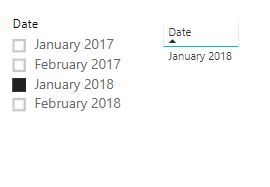
I'am filtering "Date" (in the table the value is correct):


filtering

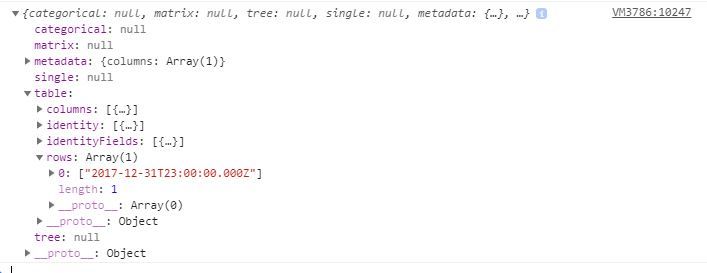
And that's what I get in the visual:

visual-input


Michał

1 ACCEPTED SOLUTION
v-viig
Community Champion
Community Champion

Most lileky dates are converted to local timezone but by default they are UTC.


Ignat Vilesov,

Software Engineer


Microsoft Power BI Custom Visuals

pbicvsupport@microsoft.com

View solution in original post

1 REPLY 1
v-viig
Community Champion
Community Champion

Most lileky dates are converted to local timezone but by default they are UTC.


Ignat Vilesov,

Software Engineer


Microsoft Power BI Custom Visuals

pbicvsupport@microsoft.com

Helpful resources

Announcements
Fabric Data Days is here Carousel

Fabric Data Days 2026

Don't miss out on Data Days, June 15 through August 7. Learn Fabric, Power BI, SQL, AI and more.

May Power BI Update Carousel

Power BI Monthly Update - May 2026

Check out the May 2026 Power BI update to learn about new features.

Power BI DataViz World Championships carousel

Power BI DataViz World Championships - June 2026

A new Power BI DataViz World Championship is coming this June! Don't miss out on submitting your entry.

Top Kudoed Authors