Good Day
Im just attempting to create a custom barchart. I have used several tutorials and they are all basically the same as the one in the documentation. However one issue I have noticed is that I am unable to plot negative values on the bar chart. If i do this, the bar just does not appear.
I have been attempting to fix this by changing the domain and ranges of the yScale as well as messing about with bar height and position. The error that I keep facing however is that when I plot a bar, the bar will always stretch down to the farthest point that it can reach. This is shown below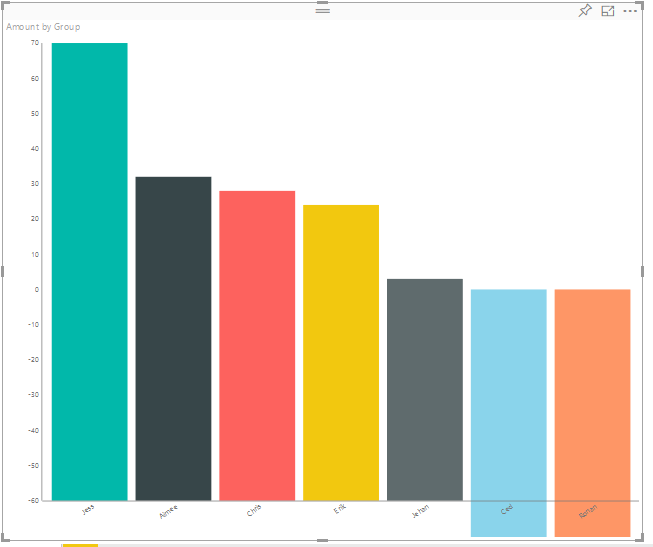
For claritys sake let me show you my data source. It is not much.
Jess: 70
Aimee: 32
Chris: 28
Erik: 24
Jehan: 3
Ced: -20
Ronan: -35
The first 5 values should be starting at the 0 tick untill their respective values and the two last negative values should be stopping at 20 and 35 respectively.
Ill also post the code if it will help?
module powerbi.extensibility.visual {

    interface DataPoint {
        category: string;
        value: number;
        colour: string;
        identity: powerbi.visuals.ISelectionId;
        highlighted: boolean;
    };

    interface ViewModel {
        dataPoints: DataPoint[];
        maxValue: number;
        highlights: boolean;
    };

    export class Visual implements IVisual {

        private host: IVisualHost;
        private svg: d3.Selection<SVGElement>;
        private barGroup: d3.Selection<SVGElement>;
        private xPadding: number = 0.1;
        private selectionManager: ISelectionManager;
        private xAxisGroup: d3.Selection<SVGElement>;
        private yAxisGroup: d3.Selection<SVGElement>;

        private settings = {
            axis: {
                x: {
                    padding: 50
                },
                y: {
                    padding: 50
                }
            },
            border: {
                top: 10
            }
        }

        constructor(options: VisualConstructorOptions) {
            this.host = options.host;
            this.svg = d3.select(options.element)
                .append("svg")
                .classed("my-little-bar-chart", true);
            this.barGroup = this.svg.append("g")
                .classed("bar-group", true);

            this.xAxisGroup = this.svg.append("g")
                .classed("x-axis", true);

            this.yAxisGroup = this.svg.append("g")
                .classed("y-axis", true);

            this.selectionManager = this.host.createSelectionManager();
        }

        public update(options: VisualUpdateOptions) {


            let viewModel = this.getViewModel(options);

            let width = options.viewport.width;
            let height = options.viewport.height;

            this.svg.attr({
                width: width,
                height: height
            });

            let yScale = d3.scale.linear()
                .domain([-60, viewModel.maxValue])
                .range([height - this.settings.axis.x.padding, 0+this.settings.border.top]);

            let yAxis = d3.svg.axis()
                .scale(yScale)
                .orient("left")
                .tickSize(1);

            this.yAxisGroup
                .call(yAxis)
                .attr({
                    transform: "translate(" + this.settings.axis.y.padding + ",0)"
                })
                .style({
                    fill: "#777777"
                })
                .selectAll("text")
                .style({
                    "text-anchor": "end",
                    "font-size": "x-small"
                });

            let xScale = d3.scale.ordinal()
                .domain(viewModel.dataPoints.map(d => d.category))
                .rangeRoundBands([this.settings.axis.y.padding, width], this.xPadding);

            let xAxis = d3.svg.axis()
                .scale(xScale)
                .orient("bottom")
                .tickSize(1);

            this.xAxisGroup
                .call(xAxis)
                .attr({
                    transform: "translate(0, " + (height - this.settings.axis.x.padding) + ")"
                })
                .style({
                    fill: "#777777"
                })
                .selectAll("text")
                .attr({
                    transform: "rotate(-35)"
                })
                .style({
                    "text-anchor": "end",
                    "font-size": "x-small"
                });

            let bars = this.barGroup
                .selectAll(".bar")
                .data(viewModel.dataPoints);

            bars.enter()
                .append("rect")
                .classed("bar", true);

            bars
                .attr({
                    width: xScale.rangeBand(),
                    height: d => {
                        if(d.value>= 0)
                        {
                            console.log("-" + yScale(1))
                            console.log("--" + yScale(2))
                            console.log("---" + yScale(32))
                            console.log(d.category +" "+(height - yScale(d.value) - this.settings.axis.x.padding- yScale(32)));
                            return height - yScale(d.value) - this.settings.axis.x.padding;
                        }
                        else{
                            console.log(d.category +d.value);
                            var _temp = Math.abs(d.value);
                            return height + yScale(_temp)- this.settings.axis.x.padding;
                        }

                    },
                    y: d =>
                    {
                        if(d.value>= 0)
                        {
                            return yScale(d.value);
                        }
                        else{
                            return yScale(0);
                        }

                    },
                    x: d => xScale(d.category)
                })
                .style({
                    fill: d => d.colour,
                    "fill-opacity": d => viewModel.highlights ? d.highlighted ? 1.0 : 0.5 : 1.0
                })
                .on("click", (d) => {
                    this.selectionManager
                        .select(d.identity, true)
                        .then(ids => {
                            bars.style({
                                "fill-opacity": d =>
                                    ids.length > 0 ?
                                        ids.indexOf(d.identity) >= 0 ?
                                            1.0 :
                                            0.5 :
                                        1.0
                            });
                        });
                });

            bars.exit()
                .remove();
        }

        private getViewModel(options: VisualUpdateOptions): ViewModel {

            let dv = options.dataViews;

            let viewModel: ViewModel = {
                dataPoints: [],
                maxValue: 0,
                highlights: false
            };

            if (!dv
                || !dv[0]
                || !dv[0].categorical
                || !dv[0].categorical.categories
                || !dv[0].categorical.categories[0].source
                || !dv[0].categorical.values)
                return viewModel;

            let view = dv[0].categorical;
            let categories = view.categories[0];
            let values = view.values[0];
            let highlights = values.highlights;

            for (let i = 0, len = Math.max(categories.values.length, values.values.length); i < len; i++) {
                viewModel.dataPoints.push({
                    category: <string>categories.values[i],
                    value: <number>values.values[i],
                    colour: this.host.colorPalette.getColor(<string>categories.values[i]).value,
                    identity: this.host.createSelectionIdBuilder()
                        .withCategory(categories, i)
                        .createSelectionId(),
                    highlighted: highlights ? highlights[i] ? true : false : false
                });
            }

            viewModel.maxValue = d3.max(viewModel.dataPoints, d => d.value);
            viewModel.highlights = viewModel.dataPoints.filter(d => d.highlighted).length > 0;

            return viewModel;
        }
    }


}
The code above is probably full of errors and mistakes, but i have only just started o be nice. 😛
Im sorry if this answer does lie somewhere and I have not seen it.
Any help with this matter would be greatly appreciated.
Ronan


