cancel
Showing results for 
Search instead for 
Did you mean: 

The Power BI Data Visualization World Championships is back! Get ahead of the game and start preparing now! Learn more

Reply
Lucy64
Advocate II
Advocate II

Custom Visual - Timeline bugs

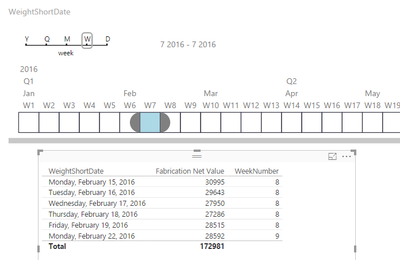
I just tried using this visual in a report, I found that when selecting data based on the day it pulls in data for the day selected and partial data from the following day.  

4 REPLIES 4
Lucy64
Advocate II
Advocate II

Here are screenshots of the problem:  Picking week is also bringing in data from the following week-

TimelineBug.PNGTimelineBug2.PNG

@Lucy64,


I've downloaded the latest Timeline(Version 1.3.7), but can not reproduce the issue. Could you please share the .pbix file, so I can test it?

Community Support Team _ Sam Zha
If this post helps, then please consider Accept it as the solution to help the other members find it more quickly.

@v-chuncz-msft

Hi Sam,  So I installed the latest version and when I test on imported data it works perfect.  However I am using Direct Query mode with SQL Server Database.  I have the file ready to send you with test data, plese give me your email address.

Riaon
Microsoft Employee
Microsoft Employee

From your description, it seems that data comes difference from Direct query. Maybe you can provide some wrong samples data and here can insert them into database.

Helpful resources

Announcements
Power BI DataViz World Championships

Power BI Dataviz World Championships

The Power BI Data Visualization World Championships is back! Get ahead of the game and start preparing now!

December 2025 Power BI Update Carousel

Power BI Monthly Update - December 2025

Check out the December 2025 Power BI Holiday Recap!

FabCon Atlanta 2026 carousel

FabCon Atlanta 2026

Join us at FabCon Atlanta, March 16-20, for the ultimate Fabric, Power BI, AI and SQL community-led event. Save $200 with code FABCOMM.