cancel
Showing results for 
Search instead for 
Did you mean: 

Data Days is here! Join us now for 60+ days of learning, challenges, and connection. Learn more

Reply
jwilmoth74
Frequent Visitor

Custom Visual HTLM formatted text viewer - Missing Menu Selection option in Desktop version

Greetings Power BI Community,


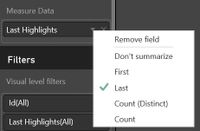
I finished a custom visual that will render HTML formatted text in a visual.  It works great in the Service/online version of Power BI, however it breaks in the Desktop version.  When investigating I noticed that the Service has a couple more menu choices when configuring the measure (First and Last)


Service Menu.JPG


The Visual works when first or last is selected. 


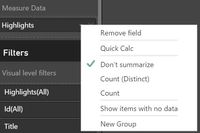
In Desktop mode, the First and Last menu choices are not there and the visual won't render with the limited choices:


Desktop Menu.JPG


I know menu choices can be in different locations between the Desktop version and online version, but I seems they are completely missing from the Desktop verison.  Does anyone know if the desktop version will get this functionality in an update soon?  Being able to see the html formatted text in the desktop version would be alot more convenient vs having to publish it every time to see the words. 


Thanks for the help!!


1 ACCEPTED SOLUTION

Maybe wait for the next power bi desktop release

View solution in original post

4 REPLIES 4
v-chuncz-msft
Community Support
Community Support

@jwilmoth74,


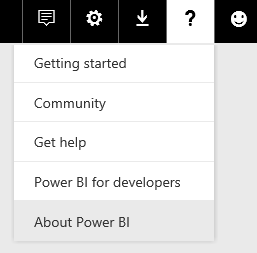
I do not have these two options. What version are you using?

Capture.PNG

Community Support Team _ Sam Zha
If this post helps, then please consider Accept it as the solution to help the other members find it more quickly.

@v-chuncz-msft,


Thanks for taking a look.  The version we are running is:


13.0.1700.899


The desktop version I am running is:


2.41.4581.361


Thanks,


Jason


Maybe wait for the next power bi desktop release

The Jan release has the feature added in the desktop version so the visual renders just fine.  


Thanks!!  

Helpful resources

Announcements
Fabric Data Days is here Carousel

Fabric Data Days 2026

Don't miss out on Data Days, June 15 through August 7. Learn Fabric, Power BI, SQL, AI and more.

May Power BI Update Carousel

Power BI Monthly Update - May 2026

Check out the May 2026 Power BI update to learn about new features.

Power BI DataViz World Championships carousel

Power BI DataViz World Championships - June 2026

A new Power BI DataViz World Championship is coming this June! Don't miss out on submitting your entry.

Top Kudoed Authors