Hi there,
I'm relatively new to developing custom visuals for PowerBI, and I've started with a slicer. I'm running into a weird issue that's probably best described with an image:
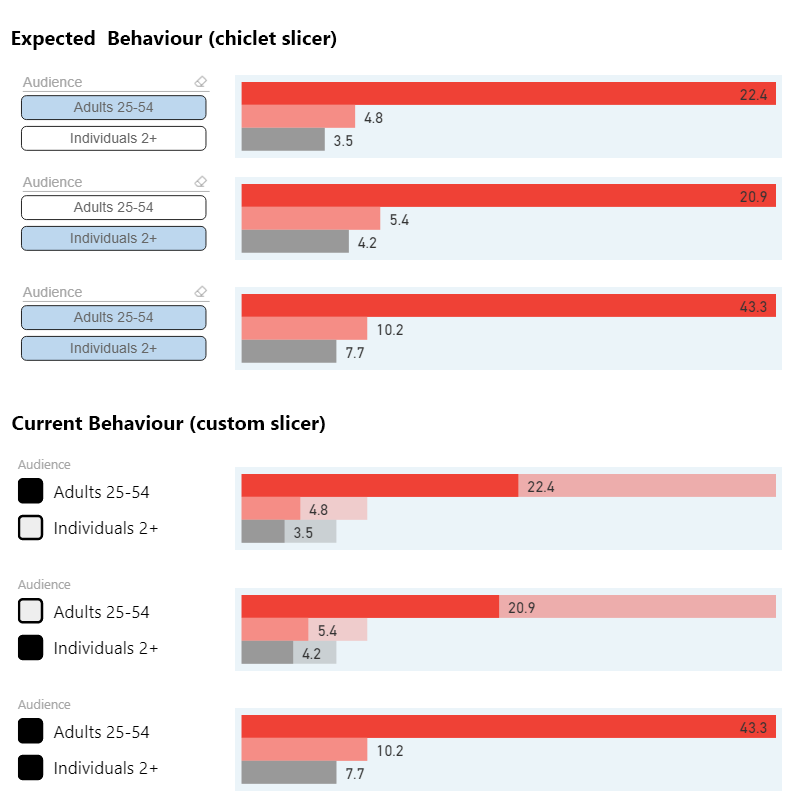
I'm hoping this is enough to go on. Note that correct numbers are returned using my slicer, but it feels more like a 'visibility:hidden' than a 'display:none', if that even approaches a worthwhile analogy 😉
Here's the selection code - I removed the UI code, settings, and pretty much everything else, since it seems to be *almost* working and I'm convinced it's an issue with how I'm selecting:
module powerbi.extensibility.visual {

    export class Visual implements IVisual {

        private host: IVisualHost;
        private selectionManager: ISelectionManager;
        private selectionIds: any = {};

        constructor(options: VisualConstructorOptions) {

            this.host = options.host;
            this.selectionManager = options.host.createSelectionManager();

        }

        // called by update on load and on settings change
        public init(options: VisualUpdateOptions) {

            this.selectionIds = {};
            const category = options.dataViews[0].categorical.categories[0];
            const values = category.values;

            values.forEach((item: number, index: number) => {

                this.selectionIds[item.toString()] = this.host.createSelectionIdBuilder()
                    .withCategory(category, index)
                    .createSelectionId();

                let value = item.toString(); // 'Adults 25-54' or 'Individuals 2+'

                // this holds the 'checkbox' and label UI elements
                const inputContainer = document.createElement('div');

                inputContainer.onclick = function (ev) {

                    this.selectionManager.clear();
                    this.selectionManager.select(this.selectionIds[value]).then((ids: ISelectionId[]) => { });
                    this.selectionManager.applySelectionFilter();

                }.bind(this);

            });

        }

    } // class

} // module
My first thought is that maybe I need to use the interactivity utils, but after digging around in chiclet's source and a few other resources, I figured it might be faster to post here and see if someone can put things into focus for me.
Thanks a lot!
Rob


