Get Fabric or SQL Certified for Free.
Get certified for free when you join Fabric Data Days 2026 and dive into Fabric, Power BI, SQL, AI, and other essential data skills.
Join now- Power BI forums
- Get Help with Power BI
- Desktop
- Service
- Report Server
- Power Query
- Mobile Apps
- Developer
- DAX Commands and Tips
- Custom Visuals Development Discussion
- Health and Life Sciences
- Power BI Spanish forums
- Translated Spanish Desktop
- Training and Consulting
- Instructor Led Training
- Dashboard in a Day for Women, by Women
- Galleries
- Data Stories Gallery
- Themes Gallery
- Contests Gallery
- QuickViz Gallery
- Quick Measures Gallery
- Visual Calculations Gallery
- Fabric Apps Gallery
- Notebook Gallery
- Translytical Task Flow Gallery
- TMDL Gallery
- R Script Showcase
- Webinars and Video Gallery
- Ideas
- Custom Visuals Ideas (read-only)
- Issues
- Issues
- Events
- Upcoming Events
July 7 - July 17 | Round 2 of the Power BI Dataviz World Championships. Don't miss your chance! Learn more
- Power BI forums
- Forums
- Get Help with Power BI
- Developer
- Re: Creating a Parent-Child Hierarchy
- Subscribe to RSS Feed
- Mark Topic as New
- Mark Topic as Read
- Float this Topic for Current User
- Bookmark
- Subscribe
- Printer Friendly Page

- Mark as New
- Bookmark
- Subscribe
- Mute
- Subscribe to RSS Feed
- Permalink
- Report Inappropriate Content
Creating a Parent-Child Hierarchy
I have a data set that looks like the following:
| ID | Name | Manager |
| 1 | Adam | John |
| 2 | John |
I want there to be another column called 'Manager ID' that obtains the ID of each person's manager from the ID column. Desired result:
| ID | Name | Manager | ManagerID |
| 1 | Adam | John | 2 |
| 2 | John |
I'm not sure how to achieve this. Thanks for your help.
Solved! Go to Solution.


- Mark as New
- Bookmark
- Subscribe
- Mute
- Subscribe to RSS Feed
- Permalink
- Report Inappropriate Content
Hi @Anonymous ,
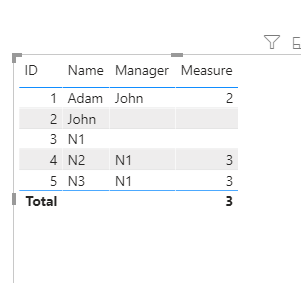
Please refer to my .pbix file.
I'm not sure if you want calculated column or measure, so both are created.
In addition, [__Maganer] is a necessary condition for calculation. Although you don't need it, the final result can not be obtained without it.
Best regards,
Lionel Chen
If this post helps, then please consider Accept it as the solution to help the other members find it more quickly.


- Mark as New
- Bookmark
- Subscribe
- Mute
- Subscribe to RSS Feed
- Permalink
- Report Inappropriate Content
@Anonymous
You may use Power Query for such scenarios,
Refer to the following article for more details:
https://www.vivran.in/post/power-query-quickbytes-1-self-join
Hope this helps.
Cheers!
Vivek
If it helps, please mark it as a solution. Kudos would be a cherry on the top 🙂
If it doesn't, then please share a sample data along with the expected results (preferably an excel file and not an image)
Blog: vivran.in/my-blog
Connect on LinkedIn
Follow on Twitter
- Mark as New
- Bookmark
- Subscribe
- Mute
- Subscribe to RSS Feed
- Permalink
- Report Inappropriate Content
Hi @Anonymous ,
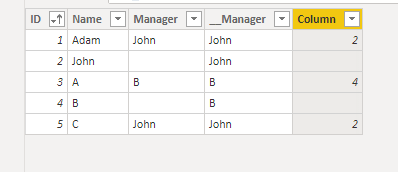
Please do like this.
Create two calculated columns.
(You can also combine these two formulas.)
__Manager =
IF(
    [Manager] = BLANK(),
    [Name], [Manager]
)
Column =
VAR x =
CALCULATE(
MAX(Sheet4[ID]),
FILTER(
Sheet4,
Sheet4[__Manager] = EARLIER(Sheet4[__Manager]) && Sheet4[Manager] = BLANK()
)
)
RETURN
IF(
[Manager] = BLANK(),
BLANK(), x
)
Best regards,
Lionel Chen
If this post helps, then please consider Accept it as the solution to help the other members find it more quickly.
- Mark as New
- Bookmark
- Subscribe
- Mute
- Subscribe to RSS Feed
- Permalink
- Report Inappropriate Content
Thanks for getting back to me. I don't need that additonal '___ Manager' column and due to that, the formula doesn't work. Any gaps where someone is the top of the hierarchy will be like this:
| ID | Name | Manager | Manager ID |
| 1 | Adam | John | 2 |
| 2 | John | John | 2 |
But I can't seem to get your second calculated column to work. Any ideas?
Thanks
- Mark as New
- Bookmark
- Subscribe
- Mute
- Subscribe to RSS Feed
- Permalink
- Report Inappropriate Content
Hi @Anonymous ,
Please refer to my .pbix file.
I'm not sure if you want calculated column or measure, so both are created.
In addition, [__Maganer] is a necessary condition for calculation. Although you don't need it, the final result can not be obtained without it.
Best regards,
Lionel Chen
If this post helps, then please consider Accept it as the solution to help the other members find it more quickly.
- Mark as New
- Bookmark
- Subscribe
- Mute
- Subscribe to RSS Feed
- Permalink
- Report Inappropriate Content
Hi @Anonymous ,
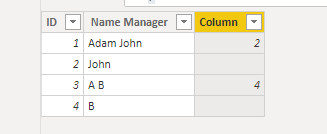
Create a calculated column like this.
Column =
VAR x =
CALCULATE(
    MAX(Sheet3[ Name Manager]),
    FILTER(
        Sheet3,
        Sheet3[ID] = EARLIER(Sheet3[ID]) + 1 && MOD( EARLIER(Sheet3[ID]), 2 ) <> 0
    )
)
VAR y =
IF(
    x = BLANK(),
    " ", x
)
RETURN
IF(
    CONTAINSSTRING(Sheet3[ Name Manager],y),
    Sheet3[ID]+1, BLANK()
)
Best regards,
Lionel Chen
If this post helps, then please consider Accept it as the solution to help the other members find it more quickly.
- Mark as New
- Bookmark
- Subscribe
- Mute
- Subscribe to RSS Feed
- Permalink
- Report Inappropriate Content
Hi @v-lionel-msft,
I'm not sure if your solution is applicable as I believe you have misunderstood my table (which isn't clear to be fair!) as Name and Manager are separate columns:
| ID | Name | Manager | Manager ID |
| 1 | Adam | John | 2 |
| 2 | John |
What I have entered in red in the desired result I need to achieve.
Thanks

- Mark as New
- Bookmark
- Subscribe
- Mute
- Subscribe to RSS Feed
- Permalink
- Report Inappropriate Content
@Anonymous - You can use LOOKUPVALUE for that. Or follow the Lookup Min/Max pattern. https://community.powerbi.com/t5/Quick-Measures-Gallery/Lookup-Min-Max/m-p/985814#M434
Also, if you create a concatenated column with a | character between then you could just use PATH
https://docs.microsoft.com/en-us/dax/path-function-dax
Follow on LinkedIn
@ me in replies or I'll lose your thread!!!
Instead of a Kudo, please vote for this idea
Become an expert!: Enterprise DNA
External Tools: MSHGQM
YouTube Channel!: Microsoft Hates Greg
Latest book!: DAX For Humans
DAX is easy, CALCULATE makes DAX hard...
- Mark as New
- Bookmark
- Subscribe
- Mute
- Subscribe to RSS Feed
- Permalink
- Report Inappropriate Content
I've tried LOOKUPVALUE but that doesn't seem to achieve what I required - unless I am using it incorrectly?
In terms of the concentrated column, would that be ID|Display Name to use PATH to pull the ID of each person's manager?
Thanks
Helpful resources

FabCon & SQLCon – Barcelona 2026
Join us in Barcelona for FabCon and SQLCon, the Fabric, Power BI, SQL, and AI community event. Save €200 with code FABCMTY200.

Power BI Monthly Update - July 2026
Check out the July 2026 Power BI update to learn about new features.

Data Days 2026
Join Data Days 2026: 60 days of free live/on-demand sessions, challenges, study groups, and certification opportunities.

Power BI DataViz World Championships - June 2026
A new Power BI DataViz World Championship is coming this June! Don't miss out on submitting your entry.

| User | Count |
|---|---|
| 2 | |
| 2 | |
| 1 | |
| 1 | |
| 1 |


