
cancel
Showing results for 
Search instead for 
Did you mean: 

The Power BI Data Visualization World Championships is back! Get ahead of the game and start preparing now! Learn more

Reply
Shreyas1902
Frequent Visitor

Creating A Power BI App – missing fields

Hi –


We are trying to create a Power BI Template App that will work for many users.  The sample data set we have has a number of custom fields so that the sample reports demonstrate many great visuals.  However, not all users of the App will have those fields.  We recognize that some visuals using the custom fields will be broken, but that should not be an issue.


In our testing of the App, when we connect to a new data source that does not have all fields, the refresh fails with error:


Processing error The column 'XXXX' of the table wasn't found.” 


Is there a way to configure a Template App so that it ignores missing fields?

1 ACCEPTED SOLUTION
Anonymous
Not applicable

HI @Shreyas1902,

Perhaps you can try to manually define a table template to initialization, then you can load correspond table records from the response table to the template.

Chris Webb's BI Blog: Creating Tables In Power BI/Power Query M Code Using #table() Chris Webb's BI ...

Sample code: 

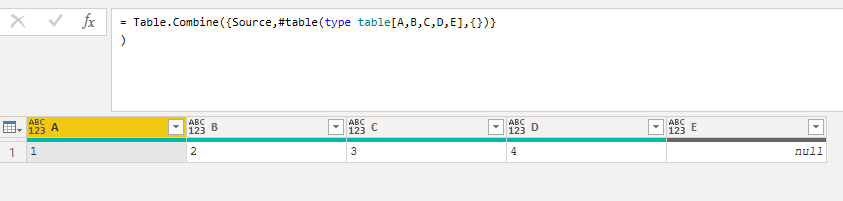
Custom1 = Table.Combine({Source,#table(type table[A,B,C,D,E],{})}

Source table:

4.png

Result:

5.png

Notice:

1. The right one is the template table with all fields.

2. ' Table.combine' function will add all the fields to the result table, the columns that do not exist in the raw table will be filled with null values.

Regards,

Xiaoxin Sheng

View solution in original post

2 REPLIES 2
Anonymous
Not applicable

HI @Shreyas1902,

Perhaps you can try to manually define a table template to initialization, then you can load correspond table records from the response table to the template.

Chris Webb's BI Blog: Creating Tables In Power BI/Power Query M Code Using #table() Chris Webb's BI ...

Sample code: 

Custom1 = Table.Combine({Source,#table(type table[A,B,C,D,E],{})}

Source table:

4.png

Result:

5.png

Notice:

1. The right one is the template table with all fields.

2. ' Table.combine' function will add all the fields to the result table, the columns that do not exist in the raw table will be filled with null values.

Regards,

Xiaoxin Sheng

lbendlin
Super User
Super User

Append a question mark to the column name selector when you manipulate it in Power Query.  Instead of 


[Column a] + [Column b] 


you can write (assuming that column b is sometimes missing)


[Column a] + [Column b]?


That will yield null if the column is missing.

Helpful resources

Announcements
Power BI DataViz World Championships

Power BI Dataviz World Championships

The Power BI Data Visualization World Championships is back! Get ahead of the game and start preparing now!

December 2025 Power BI Update Carousel

Power BI Monthly Update - December 2025

Check out the December 2025 Power BI Holiday Recap!

FabCon Atlanta 2026 carousel

FabCon Atlanta 2026

Join us at FabCon Atlanta, March 16-20, for the ultimate Fabric, Power BI, AI and SQL community-led event. Save $200 with code FABCOMM.