We've captured the moments from FabCon & SQLCon that everyone is talking about, and we are bringing them to the community, live and on-demand. Starts on April 14th. Register now
Hi All,
is it possible to create tables or queries with Power BI embedded R Script and then use them with Power BI standard Visualizations?
Thx
Solved! Go to Solution.
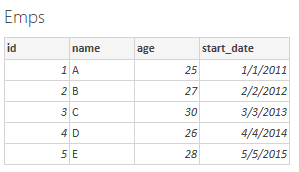
Yes, with just a few steps in Power BI Desktop you can run R scripts and create a data model, from which you can create reports, and share them on the Power BI service. See the following R script as an example.
# Create the data frame.
Emps <- data.frame(
id = c(1:5),
name = c("A", "B", "C", "D", "E"),
age = c(25, 27, 30, 26, 28),
start_date = as.Date(c("2011-01-01", "2012-02-02", "2013-03-03", "2014-04-04", "2015-05-05")),
stringsAsFactors = FALSE
)I know this question has been asked and answered already. However, it doesn't really address some of other challenges when working with R in Power BI. For example, how to do create a tabular report directly in Power BI using only the data you loaded -- let's say the data was loaded directly from the database and you clicked on R under the visualizations and you added couple of fields into the R script editor. So, how do you create a table using only those fields?
Yes, with just a few steps in Power BI Desktop you can run R scripts and create a data model, from which you can create reports, and share them on the Power BI service. See the following R script as an example.
# Create the data frame.
Emps <- data.frame(
id = c(1:5),
name = c("A", "B", "C", "D", "E"),
age = c(25, 27, 30, 26, 28),
start_date = as.Date(c("2011-01-01", "2012-02-02", "2013-03-03", "2014-04-04", "2015-05-05")),
stringsAsFactors = FALSE
)It works, thank you!
If you have recently started exploring Fabric, we'd love to hear how it's going. Your feedback can help with product improvements.
A new Power BI DataViz World Championship is coming this June! Don't miss out on submitting your entry.
| User | Count |
|---|---|
| 1 | |
| 1 | |
| 1 | |
| 1 | |
| 1 |