Join us at FabCon Atlanta from March 16 - 20, 2026, for the ultimate Fabric, Power BI, AI and SQL community-led event. Save $200 with code FABCOMM.
Register now!The Power BI Data Visualization World Championships is back! It's time to submit your entry. Live now!
Hi all,
I need to implement a dashboard that will present several bar charts based on the number of rows returned in my dataset. As illustration, my dataset is like below:
Category KPI Value
CAT1 KPI A 10
CAT1 KPI B 5
CAT2 KPI C 3
CAT3 KPI D 8
CAT3 KPI E 1
CAT3 KPI F 10
CAT3 KPI G 9
The slicer will contain the list of categories (CAT1, CAT2, CAT3). If the user selects the CAT1 on the slicer, then my dashboard needs to present 2 diferent bar charts for KPI A and KPI B. If the user selects CAT3 then the dashboard will present 4 diferent bar charts.
How to implement that? Do I need to create a custom visual? If so, is there any example to guide me?
Thanks a lot,
Guilherme Soares
@soaregj wrote:
Hi all,
I need to implement a dashboard that will present several bar charts based on the number of rows returned in my dataset. As illustration, my dataset is like below:
Category KPI Value
CAT1 KPI A 10
CAT1 KPI B 5
CAT2 KPI C 3
CAT3 KPI D 8
CAT3 KPI E 1
CAT3 KPI F 10
CAT3 KPI G 9
The slicer will contain the list of categories (CAT1, CAT2, CAT3). If the user selects the CAT1 on the slicer, then my dashboard needs to present 2 diferent bar charts for KPI A and KPI B. If the user selects CAT3 then the dashboard will present 4 diferent bar charts.
How to implement that? Do I need to create a custom visual? If so, is there any example to guide me?
Thanks a lot,
Guilherme Soares
I don't think it is possible, even with custom visual. The slicer visual is for filtering data and it can't control other visuals shown/hidden.
As a workaround, instead of showing different bar charts, show the data in one chart setting the KPI as "Legend" field.
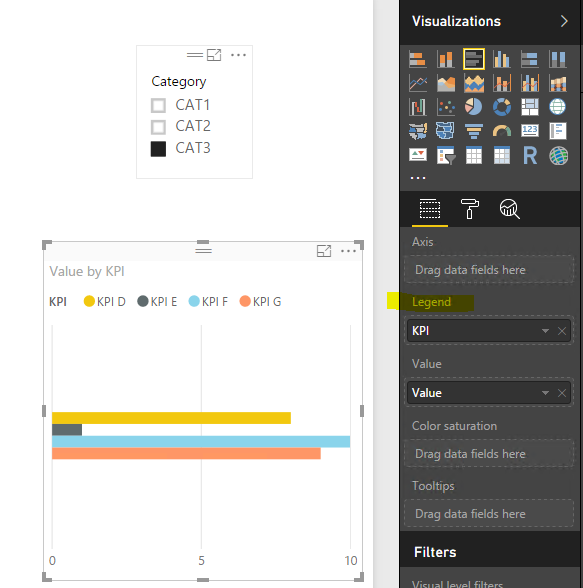
Thanks @Eric_Zhang. I was probably too simplistic in my example. Sorry for that.
What I need is something like in the link below. Please notice every chart is a KPI and the quantity of KPI's (charts) varies from the location selected in the ChicletSlicer, meaning the charts are dynamically created on the report.
https://drive.google.com/file/d/0B7MRYt91QJPATGd4VEEzeVpzMkE/view
Thanks,
Guilherme
The Power BI Data Visualization World Championships is back! It's time to submit your entry.
Check out the January 2026 Power BI update to learn about new features.
| User | Count |
|---|---|
| 3 | |
| 3 | |
| 2 | |
| 1 | |
| 1 |
| User | Count |
|---|---|
| 6 | |
| 3 | |
| 3 | |
| 2 | |
| 2 |