Join the FabCon + SQLCon recap series. Up next: Power BI, Real-Time Intelligence, IQ and AI, and Data Factory take center stage. All sessions are available on-demand after the live show. Register now
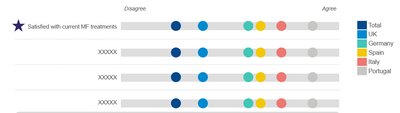
I'm looking around to find a component to create this representation. Basically, a line with a minimum and maximum values.Each point (in this screenshot each point is a country) has a place in the line based on the value. Also, I want to filder the data.
If a component like that doesn't exist, I want to create my custom component. How can I do that? I didn't see a project in Visual Studio per example. Is there any how-to?
Solved! Go to Solution.
Hi @Anonymous ,
Business Apps – Microsoft AppSource
Try to find such a custom visual in the app source, If you can't find, you may need to create one.
Create Visual/Custom Visual for Power BI: Different Approaches - RADACAD
Best regards,
Lionel Chen
If this post helps, then please consider Accept it as the solution to help the other members find it more quickly.
Hi @Anonymous ,
Business Apps – Microsoft AppSource
Try to find such a custom visual in the app source, If you can't find, you may need to create one.
Create Visual/Custom Visual for Power BI: Different Approaches - RADACAD
Best regards,
Lionel Chen
If this post helps, then please consider Accept it as the solution to help the other members find it more quickly.
Check out the April 2026 Power BI update to learn about new features.
If you have recently started exploring Fabric, we'd love to hear how it's going. Your feedback can help with product improvements.
A new Power BI DataViz World Championship is coming this June! Don't miss out on submitting your entry.
| User | Count |
|---|---|
| 2 | |
| 2 | |
| 1 | |
| 1 | |
| 1 |