Join us at FabCon Atlanta from March 16 - 20, 2026, for the ultimate Fabric, Power BI, AI and SQL community-led event. Save $200 with code FABCOMM.
Register now!Learn from the best! Meet the four finalists headed to the FINALS of the Power BI Dataviz World Championships! Register now
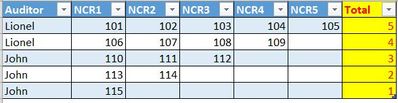
I have similar table and i have used excel Count formula to calculate column Total. I wanted to know what is the DAX formula to be used to get similar result in Power BI.
Thanks
Lionel
Solved! Go to Solution.
You can create a calculated column.
Total = IF(ISBLANK(Table1[NCR1]),0,1)+IF(ISBLANK(Table1[NCR2]),0,1)+IF(ISBLANK(Table1[NCR3]),0,1)+IF(ISBLANK(Table1[NCR4]),0,1)+IF(ISBLANK(Table1[NCR5]),0,1)
You can create a calculated column.
Total = IF(ISBLANK(Table1[NCR1]),0,1)+IF(ISBLANK(Table1[NCR2]),0,1)+IF(ISBLANK(Table1[NCR3]),0,1)+IF(ISBLANK(Table1[NCR4]),0,1)+IF(ISBLANK(Table1[NCR5]),0,1)
Share feedback directly with Fabric product managers, participate in targeted research studies and influence the Fabric roadmap.
Check out the February 2026 Power BI update to learn about new features.
| User | Count |
|---|---|
| 3 | |
| 3 | |
| 2 | |
| 2 | |
| 1 |
| User | Count |
|---|---|
| 5 | |
| 4 | |
| 3 | |
| 3 | |
| 2 |