cancel
Showing results for 
Search instead for 
Did you mean: 

Get Fabric certified for FREE! Don't miss your chance! Learn more

Reply
Vilas_Techie
Frequent Visitor

Conditional formatting based on Field value on calculated measure

Vilas_Techie_0-1671787450652.png

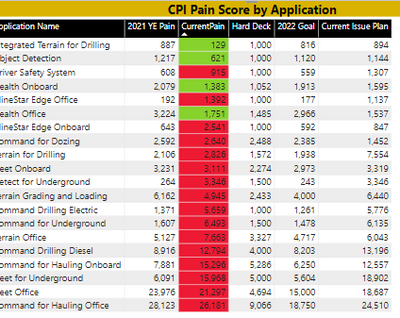
 I want to apply conditional formatting for CurrentPain

Conditions:1)currentpain> 2022 goal is Red

                  2) currentpain <= 2022 goal is green

                  3) currentpain in between 2021 YE pain and 2022 goal is Yellow

How can this be achieved? looks like the rules method only allows for hardcoded values. Is there a workaround for this?

Thanks,

Vilas


@amitchandak

@vicky_ 

@Greg_Deckler

@Ashish_Mathur

@ lbendlin

@Robert_BI

@Senthil_Kumar

2 REPLIES 2
Anonymous
Not applicable

Hi @Vilas_Techie,

Any update on this? Can you please share a pbix or some dummy data that keep the raw data structure with expected results? It should help us clarify your scenario and test to coding formula.

How to Get Your Question Answered Quickly  

Regards,

Xiaoxin Sheng

lbendlin
Super User
Super User

You can do that via a measure. 

Please provide sample data that covers your issue or question completely.
https://community.powerbi.com/t5/Community-Blog/How-to-provide-sample-data-in-the-Power-BI-Forum/ba-...
Please show the expected outcome based on the sample data you provided.

https://community.powerbi.com/t5/Desktop/How-to-Get-Your-Question-Answered-Quickly/m-p/1447523

Helpful resources

Announcements
Join our Fabric User Panel

Join our Fabric User Panel

Share feedback directly with Fabric product managers, participate in targeted research studies and influence the Fabric roadmap.

January Power BI Update Carousel

Power BI Monthly Update - January 2026

Check out the January 2026 Power BI update to learn about new features.

FabCon Atlanta 2026 carousel

FabCon Atlanta 2026

Join us at FabCon Atlanta, March 16-20, for the ultimate Fabric, Power BI, AI and SQL community-led event. Save $200 with code FABCOMM.