Join us at FabCon Atlanta from March 16 - 20, 2026, for the ultimate Fabric, Power BI, AI and SQL community-led event. Save $200 with code FABCOMM.
Register now!The Power BI Data Visualization World Championships is back! Get ahead of the game and start preparing now! Learn more
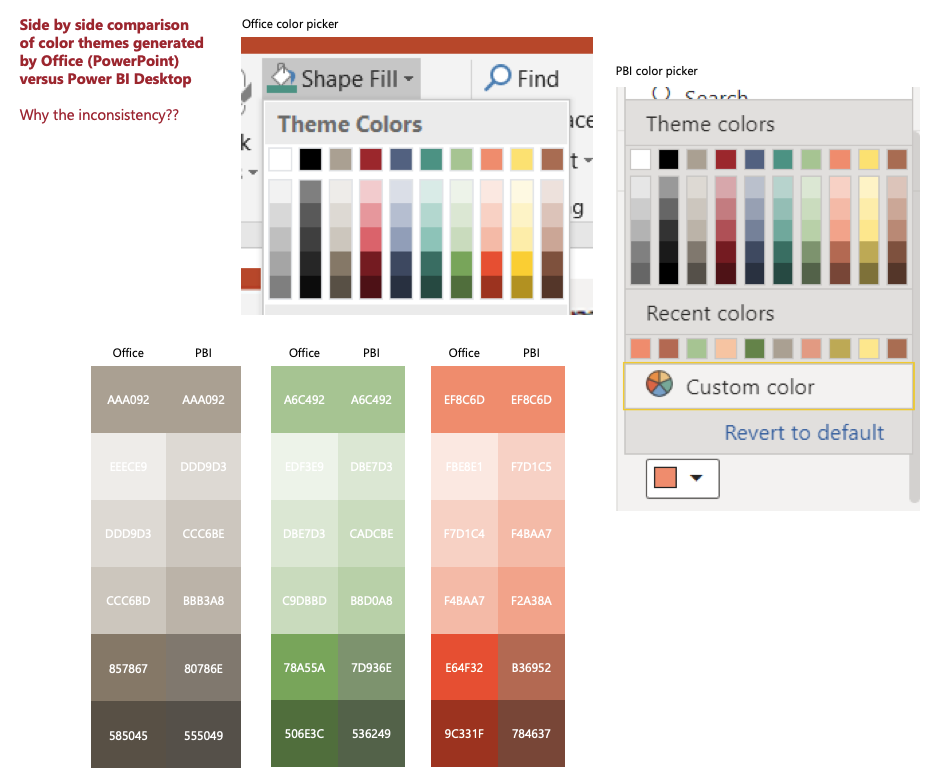
I have created a custom Report Theme with hex codes in a JSON file, the 8 data colors show accurately but the other 5 palette values (3 tints + 2 shades per hex provided) are different from the values in other Microsoft Office applications (PPT, Word, etc). Is this a bug or deliberate? Seems like we'd all want the two to be consistent so PBI reports could match other corporate themed materials... I was also hoping to use PPT regularly for quick mockups of graphs before building them out in PBI...
Tints start a step darker in PBI compared to Office
Shades are not as vibrant, very muted in PBI compared to Office
This seems like standardization is missing between Power BI and Microsoft Office products. It would be great if they were standardized to more seemlessly integrate across all Microsoft products.
The Power BI Data Visualization World Championships is back! Get ahead of the game and start preparing now!
| User | Count |
|---|---|
| 3 | |
| 3 | |
| 2 | |
| 2 | |
| 1 |
| User | Count |
|---|---|
| 4 | |
| 4 | |
| 4 | |
| 3 | |
| 3 |