cancel
Showing results for 
Search instead for 
Did you mean: 

The Power BI Data Visualization World Championships is back! Get ahead of the game and start preparing now! Learn more

Reply
Simiyon
Frequent Visitor

Change map data bubble color when selected

I am using a map with bubbles in my report. When I select a specific bubble on the map location, I need to change the selected bubble with different color and the non-selected bubble to a different color. Whether can it be achievable? If so, Can anyone help me to achieve this logic? 


1 ACCEPTED SOLUTION
Anonymous
Not applicable

Hi @Simiyon ,

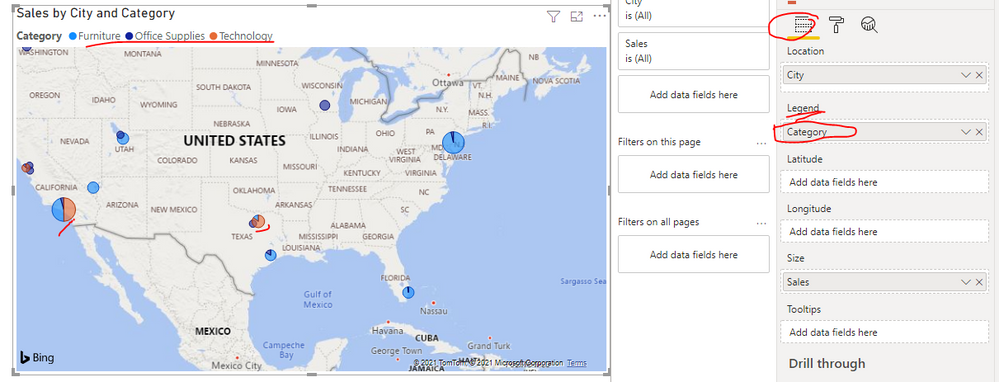
We can't make the corresponding conditional formatting since we can't get the value of the selected bubble. If you just need to simply distinguish each location by color, you can put the fields just like category or region field in Legend Fields, then it will display different colors base on the legend field values...

yingyinr_0-1626336747920.png

Best Regards

View solution in original post

1 REPLY 1
Anonymous
Not applicable

Hi @Simiyon ,

We can't make the corresponding conditional formatting since we can't get the value of the selected bubble. If you just need to simply distinguish each location by color, you can put the fields just like category or region field in Legend Fields, then it will display different colors base on the legend field values...

yingyinr_0-1626336747920.png

Best Regards

Helpful resources

Announcements
Power BI DataViz World Championships

Power BI Dataviz World Championships

The Power BI Data Visualization World Championships is back! Get ahead of the game and start preparing now!

December 2025 Power BI Update Carousel

Power BI Monthly Update - December 2025

Check out the December 2025 Power BI Holiday Recap!

FabCon Atlanta 2026 carousel

FabCon Atlanta 2026

Join us at FabCon Atlanta, March 16-20, for the ultimate Fabric, Power BI, AI and SQL community-led event. Save $200 with code FABCOMM.