Join us at FabCon Atlanta from March 16 - 20, 2026, for the ultimate Fabric, Power BI, AI and SQL community-led event. Save $200 with code FABCOMM.
Register now!The Power BI Data Visualization World Championships is back! Get ahead of the game and start preparing now! Learn more
I'm trying to create a custom visual where the user should be able to pick colors for each category.
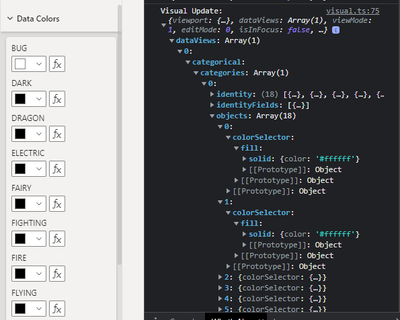
I'm able to generate the color picker as shown in the screenshot, but my problem is that when I update one of the categories, all of the pickers update. Similar code structure seems to work from the Sample Bar Chart, so I'm not sure where setting the color is going wrong.
In the screenshot, you can see the each node corresponds to an object in that list. And when I change only the first one to white (#ffffff) all of the color picker change their property color.
Let me know what additional information would be helpful for troubleshooting. I'm creating a chord chart using categorical data structure with 2 groupings and a measure.
Check out the November 2025 Power BI update to learn about new features.
Advance your Data & AI career with 50 days of live learning, contests, hands-on challenges, study groups & certifications and more!
| User | Count |
|---|---|
| 4 | |
| 2 | |
| 2 | |
| 1 | |
| 1 |
| User | Count |
|---|---|
| 10 | |
| 10 | |
| 4 | |
| 3 | |
| 3 |