cancel
Showing results for 
Search instead for 
Did you mean: 

The Power BI Data Visualization World Championships is back! Get ahead of the game and start preparing now! Learn more

Reply
sana_sagheer
Advocate I
Advocate I

Calculation, single chart based on 3 measures

I have this issue, I am having a Reveneue KPI thats comprised of 3 components(each is a separate measure). I want my bar chart to show the revenue as total in first layer of hierarchy. and want to display each component revenue at subsequent node of hierarchy. 
like node 0 -> total revenue
node 1-> component 1  revenue

node 2-> component 2  revenue

node 3-> component 3  revenue

Please guide how can we do it?


Thanks in advance,
Sana

1 ACCEPTED SOLUTION

Thanks everyone, we acheived the solution using Switch function and added component type table as selector for selecting one component type or the other. 

View solution in original post

3 REPLIES 3
Eric_Zhang
Microsoft Employee
Microsoft Employee


@sana_sagheer wrote:

I have this issue, I am having a Reveneue KPI thats comprised of 3 components(each is a separate measure). I want my bar chart to show the revenue as total in first layer of hierarchy. and want to display each component revenue at subsequent node of hierarchy. 
like node 0 -> total revenue
node 1-> component 1  revenue

node 2-> component 2  revenue

node 3-> component 3  revenue

Please guide how can we do it?


Thanks in advance,
Sana


@sana_sagheer

Maybe you can create a tricky measure to detect the hierarchy level and then show different measures accordingly. Just replace 1,2,3,4 with the measures in your case. See more in the attached pbix file.

Measure = 
SWITCH (
    TRUE (),
    HASONEVALUE ( yourTable[node0] ) && NOT ( ISFILTERED ( yourTable[node1] ) )
        && NOT ( ISFILTERED ( yourTable[node2] ) )
        && NOT ( ISFILTERED ( yourTable[node3] ) ), 1,  // in hierachy level 1
    HASONEVALUE ( yourTable[node0] ) && HASONEVALUE ( yourTable[node1] )
        && NOT ( ISFILTERED ( yourTable[node2] ) )
        && NOT ( ISFILTERED ( yourTable[node3] ) ), 2,  // in hierarchy level 2
    HASONEVALUE ( yourTable[node0] ) && HASONEVALUE ( yourTable[node1] )
        && HASONEVALUE ( yourTable[node2] )
        && NOT ( ISFILTERED ( yourTable[node3] ) ), 3,  // in hierarchy level 3
    4 //in hierarcy level 4
)
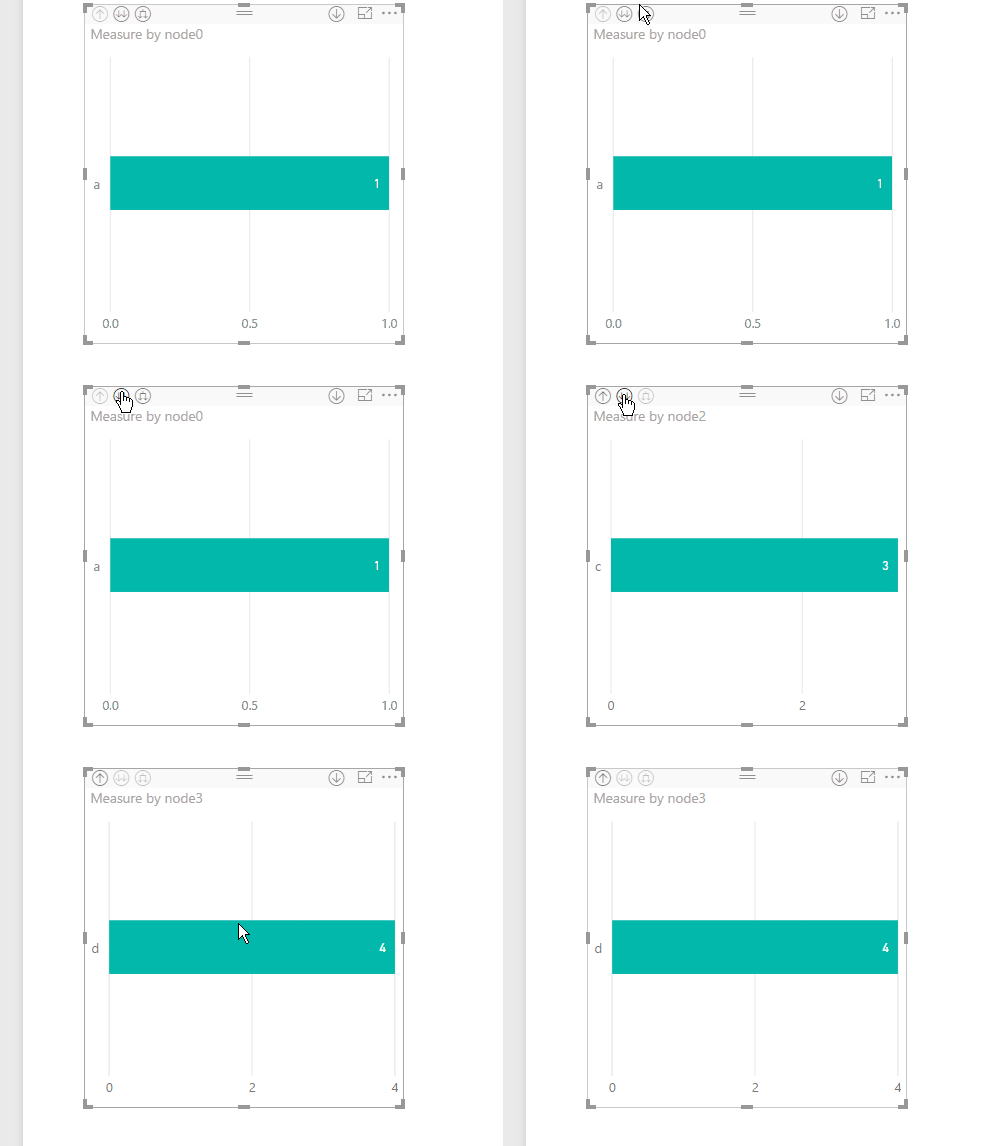
drilldown.gif

Greg_Deckler
Community Champion
Community Champion

Hmm, that's an interesting problem. I am not aware of a way to build a hierarchy with measures so interested in seeing if someone has an interesting solution to this. You could definitely do it in two different visualizations.


Follow on LinkedIn
@ me in replies or I'll lose your thread!!!
Instead of a Kudo, please vote for this idea
Become an expert!: Enterprise DNA
External Tools: MSHGQM
YouTube Channel!: Microsoft Hates Greg
Latest book!:
DAX For Humans

DAX is easy, CALCULATE makes DAX hard...

Thanks everyone, we acheived the solution using Switch function and added component type table as selector for selecting one component type or the other. 

Helpful resources

Announcements
Power BI DataViz World Championships

Power BI Dataviz World Championships

The Power BI Data Visualization World Championships is back! Get ahead of the game and start preparing now!

December 2025 Power BI Update Carousel

Power BI Monthly Update - December 2025

Check out the December 2025 Power BI Holiday Recap!

FabCon Atlanta 2026 carousel

FabCon Atlanta 2026

Join us at FabCon Atlanta, March 16-20, for the ultimate Fabric, Power BI, AI and SQL community-led event. Save $200 with code FABCOMM.