
cancel
Showing results for 
Search instead for 
Did you mean: 

July 7 - July 17 | Round 2 of the Power BI Dataviz World Championships. Don't miss your chance! Learn more

Reply
pbi_wannabe_exp
Regular Visitor

Calculated groups using Tabular Editor

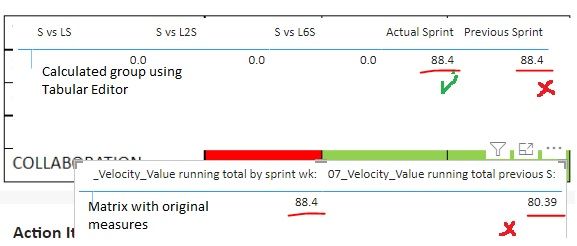
The strange thing that I cant make one measure working. The first part of the calculation (Actual Sprint) shows correct data, but the second part which should be the previous sprint value, returns to the actual result. The result calculation should follow the red framed calculation (based on a sprint selector in PBI). I tried to modify -1 Sprint Wk CC to -5 or -3 etc., it doesn't show any difference. Any hints? Many thanks in advance!first calc.jpgsecond calc.jpgresult.jpg

1 ACCEPTED SOLUTION
Anonymous
Not applicable

HI @pbi_wannabe_exp,

I think this scenario may be related to the 'all' function, it will ignore all filters on the table so it may conflict with getting the current field value. (max function are calculated on the fixed all table records and get static result)

ALL function (DAX) - DAX | Microsoft Docs

Have you tried to create a variable and move this type of operation out of the current calculation row context?

formual =
VAR currValue =
    MAX ( Calendar[Sprint Year CC] )
RETURN
    CALCULATE (
        SELECTEDMEASURE (),
        FILTER ( ALL ( Calendar ), [Sprint Year CC] <= currValue )
    )

Regards,

Xiaoxin Sheng

View solution in original post

1 REPLY 1
Anonymous
Not applicable

HI @pbi_wannabe_exp,

I think this scenario may be related to the 'all' function, it will ignore all filters on the table so it may conflict with getting the current field value. (max function are calculated on the fixed all table records and get static result)

ALL function (DAX) - DAX | Microsoft Docs

Have you tried to create a variable and move this type of operation out of the current calculation row context?

formual =
VAR currValue =
    MAX ( Calendar[Sprint Year CC] )
RETURN
    CALCULATE (
        SELECTEDMEASURE (),
        FILTER ( ALL ( Calendar ), [Sprint Year CC] <= currValue )
    )

Regards,

Xiaoxin Sheng

Helpful resources

Announcements
FabCon and SQLCon Barcelona 2026

FabCon & SQLCon – Barcelona 2026

Join us in Barcelona for FabCon and SQLCon, the Fabric, Power BI, SQL, and AI community event. Save €200 with code FABCMTY200.

60 days of Data Days Carousel

Data Days 2026

Join Fabric Data Days 2026: 60 days of free live/on-demand sessions, challenges, study groups, and certification opportunities.

Power BI DataViz World Championships carousel

Power BI DataViz World Championships - June 2026

A new Power BI DataViz World Championship is coming this June! Don't miss out on submitting your entry.