cancel
Showing results for 
Search instead for 
Did you mean: 

We've captured the moments from FabCon & SQLCon that everyone is talking about, and we are bringing them to the community, live and on-demand. Starts on April 14th. Register now

Reply
anderb
New Member

Alert or email triggered by table value

Hello


I have developed a report to monitor system parameters. If any of the parameters change, I need some sort of notification or alert. So I have two questions:


1. Is Power BI capable of automatically generating an email if a value in a table changes. That is - I have a column where if the value is anything greater than 0.00, I would like an email to be sent.


2.  Is it possible for an alert to be generated if a table value changes. As above, if the column value is greater than 0.00, an alert is triggered.


Thank you in advance

1 ACCEPTED SOLUTION

I am affraid this is not possible.
There might be an workaround, but it's bit advanced:
1. You might create Power Automate flow, which queries the data and basically "replicate" the table you have above.
2. You set up a condition in your flow. Something like IF Albania >5, THEN xxx
3. You set up action, which would be notification.

I think the basic idea can be understood from the following video:
https://www.youtube.com/watch?v=WUSo5GLV6uk&t=1s&ab_channel=Curbal


If my answer was helpful please give me a Kudos or even accept as a Solution.

Let's connect on LinkedIn!

View solution in original post

5 REPLIES 5
Migasuke
Memorable Member
Memorable Member

Hi @anderb ,


you can't use tables for your notifications but you can use dashboard and tiles. There is possibility to set up power automate flow, which can send any kinds of notifications.


Details are here:

https://learn.microsoft.com/en-us/power-bi/create-reports/service-set-data-alerts


If my answer was helpful please give me a Kudos or even accept as a Solution.

Let's connect on LinkedIn!

Thanks for you response @Migasuke .  I'm surprised some sort of alert or notification can't be generated from a table value.


Alternativly - is it possible to highlight a linked slicer based on a change in cell value?


Thank you

Hi,
how should it work? I am not sure if I get it.


If my answer was helpful please give me a Kudos or even accept as a Solution.

Let's connect on LinkedIn!

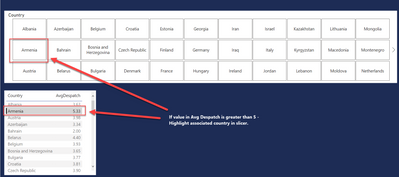
Hopefully the screenshot below explains it a little better. So as an example:

If the value in the AvgDespatch column is greater than 5, highlight the associated country in the slicer.

anderb_2-1670457422744.png


I am affraid this is not possible.
There might be an workaround, but it's bit advanced:
1. You might create Power Automate flow, which queries the data and basically "replicate" the table you have above.
2. You set up a condition in your flow. Something like IF Albania >5, THEN xxx
3. You set up action, which would be notification.

I think the basic idea can be understood from the following video:
https://www.youtube.com/watch?v=WUSo5GLV6uk&t=1s&ab_channel=Curbal


If my answer was helpful please give me a Kudos or even accept as a Solution.

Let's connect on LinkedIn!

Helpful resources

Announcements
New to Fabric survey Carousel

New to Fabric Survey

If you have recently started exploring Fabric, we'd love to hear how it's going. Your feedback can help with product improvements.

Power BI DataViz World Championships carousel

Power BI DataViz World Championships - June 2026

A new Power BI DataViz World Championship is coming this June! Don't miss out on submitting your entry.

Join our Fabric User Panel

Join our Fabric User Panel

Share feedback directly with Fabric product managers, participate in targeted research studies and influence the Fabric roadmap.

March Power BI Update Carousel

Power BI Community Update - March 2026

Check out the March 2026 Power BI update to learn about new features.