cancel
Showing results for 
Search instead for 
Did you mean: 

The Power BI Data Visualization World Championships is back! Get ahead of the game and start preparing now! Learn more

Reply
mattkocak
Kudo Kingpin
Kudo Kingpin

Adding Filter Properties to Format Pane

I'm developing a custom slicer where I would like the user to be able to select unique filter settings for each column (category) that's been added to the visual. I would like them to be able to specify this in the format pane. I'm looking into the options to accomplish this and wanted to see if any more experienced developers could point me in the right direction.


In a perfect world, I would like something like the filters in the filter pane to be selectable in the format pane. You could select a column from a dropdown menu (similar to the Conditional formatting section of the table's format pane) and then specify the filter for that column (mock-up below).
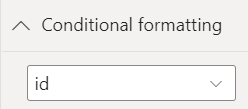
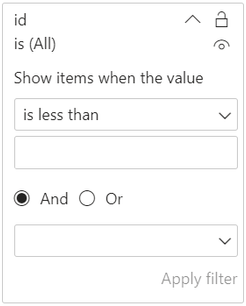
tetra_matt_2-1642437223986.png

tetra_matt_1-1642437197556.png


Otherwise, maybe a user could specify the column/filter from a pop-up window. The window would be accessed via a link (similar to the Advanced controls link, also in the Conditional formatting section of the table's format pane). My thinking is that a pop-up window might be more versatile than the format pane when doing custom development of visuals.
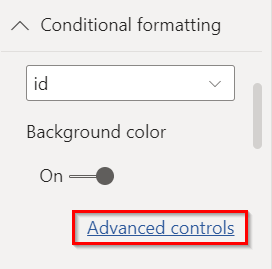
 

tetra_matt_3-1642437530853.png


Through researching, I've found bits and pieces on accomplishing small pieces of each of these solutions, but no clear path in the right direction. Does someone with a little more experience have a suggestion on a good route to go here or if there are any major road-blocks with either of the solutions I outline above? Any documentation would be extremely helpful!

1 ACCEPTED SOLUTION
Anonymous
Not applicable

Hi @mattkocak ,

After my investigation, I didn't find any suitable property or method to add the columns information from the Filters pane as a drop-down list under the Format pane. Maybe you can raise a new idea and add your comments there to make this feature coming sooner. In addition, could you please share what is the purpose of this feature you are trying to implement? Maybe we can achieve this "purpose" in some other way...

Best Regards

View solution in original post

2 REPLIES 2
Anonymous
Not applicable

Hi @mattkocak ,

After my investigation, I didn't find any suitable property or method to add the columns information from the Filters pane as a drop-down list under the Format pane. Maybe you can raise a new idea and add your comments there to make this feature coming sooner. In addition, could you please share what is the purpose of this feature you are trying to implement? Maybe we can achieve this "purpose" in some other way...

Best Regards

Hey @Anonymous ,


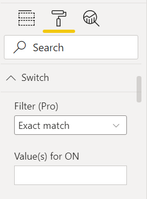
Thanks for investigating this. I'm trying to develop a slicer similar to the Advanced Toggle Switch, which allows you to filter multiple values with one click. Their slicer allows you to specify a comma separated list of values to filter on.


tetra_matt_0-1643318073326.png


This solution is acceptable and very doable, but I was hoping to allow users to select more robust filtering criteria in the format pane. If this ability is not available, though, then I will continue with a more basic input method.


I'm not sure how useful further development of this "filter in format pane" ability would be to other developers so I won't submit a request at this time. However, if you think that there's value in it, then I could summarize this feature and submit an idea. Thanks again!

Helpful resources

Announcements
Power BI DataViz World Championships

Power BI Dataviz World Championships

The Power BI Data Visualization World Championships is back! Get ahead of the game and start preparing now!

December 2025 Power BI Update Carousel

Power BI Monthly Update - December 2025

Check out the December 2025 Power BI Holiday Recap!

FabCon Atlanta 2026 carousel

FabCon Atlanta 2026

Join us at FabCon Atlanta, March 16-20, for the ultimate Fabric, Power BI, AI and SQL community-led event. Save $200 with code FABCOMM.