Get certified for free when you join Fabric Data Days 2026 and dive into Fabric, Power BI, SQL, AI, and other essential data skills.
Join nowTry your skills in the Power BI Dataviz World Championship! Round one ends June 26. Join now
Hello all,
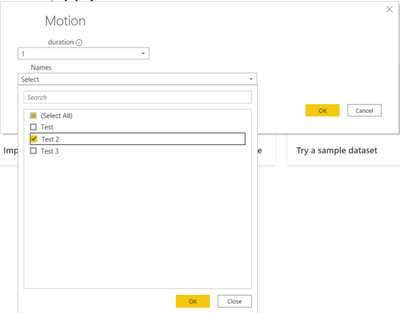
Is it possible to add filter to Custom Connector with data loaded from API (list of values). We are already using static "xxx Duration" (days) with numbers 1..30. This is working fine. Hower would it be possible to implement list loaded ahead and pre filter data in Navigation Table with the value user picks at the beginning. Something like below print screen(the "xxx Name" list values are just static values only for test purpose here). Could you please point to right direction if there is any implementation as per this topic? Thank you
Solved! Go to Solution.
Hi @OndrejH ,
I found some blogs about creating custom connectors and a thread with the same needs as yours, hopefully the methods used in them will help you.
Power BI Custom Connector – Quick Start
Custom Data Connector: How to Deploy and Test
Custom Connectors - how to pass parameters (see the message 6 from seadude)
There is an easier way to pass parameters in the URL. When creating a Custom Connector, use "{}" in the path for each dynamic parameter.
**Example:**
https://test.com/api/{version}/{parameter1}/test
Best Regards
Hi @OndrejH ,
I found some blogs about creating custom connectors and a thread with the same needs as yours, hopefully the methods used in them will help you.
Power BI Custom Connector – Quick Start
Custom Data Connector: How to Deploy and Test
Custom Connectors - how to pass parameters (see the message 6 from seadude)
There is an easier way to pass parameters in the URL. When creating a Custom Connector, use "{}" in the path for each dynamic parameter.
**Example:**
https://test.com/api/{version}/{parameter1}/test
Best Regards
Does the "{}" work with the service? or will it treat is as a dynamic connector?
Don't miss out on Data Days, June 15 through August 7. Learn Fabric, Power BI, SQL, AI and more.
Check out the May 2026 Power BI update to learn about new features.