This time we’re going bigger than ever. Fabric, Power BI, SQL, AI and more. We're covering it all. You won't want to miss it.
Learn moreDid you hear? There's a new SQL AI Developer certification (DP-800). Start preparing now and be one of the first to get certified. Register now
I've successfully modified the MS BulletChart visual to achieve seven bands, instead of four, and some other items. Now, I want to add context menu support (right-click) and I'm having the hardest time implementing this.
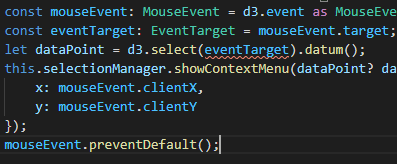
After following the documentation I'm getting errors on the "eventTarget" portion of this:
this.svg.on('contextmenu', () => {
const mouseEvent: MouseEvent = d3.event as MouseEvent;
const eventTarget: EventTarget = mouseEvent.target;
let dataPoint = d3.select(eventTarget).datum();
this.selectionManager.showContextMenu(dataPoint? dataPoint.selectionId : {}, {
x: mouseEvent.clientX,
y: mouseEvent.clientY
});
mouseEvent.preventDefault();
});
This bullet chart is so complex, that nothing seems to match up with any documentation I'm seeing. I'm surprised this visual didn't already come equipped to handle a context menu. The drill-down roles support is listed in the capabilities.json.
Looking for some guidance on how to get this accomplished.
Hi @jazfunk ,
Maybe you can refer to the link.
Best regards,
Lionel Chen
If this post helps, then please consider Accept it as the solution to help the other members find it more quickly.
@v-lionel-msft thank you for your input, however, this is the same link I posted in my question, and the one in which I used to attempt to implement this feature. This produces errors, as written. The error states that "no overload matches this call".
Again, thanks for the input.
Check out the April 2026 Power BI update to learn about new features.
Sign up to receive a private message when registration opens and key events begin.
If you have recently started exploring Fabric, we'd love to hear how it's going. Your feedback can help with product improvements.
| User | Count |
|---|---|
| 4 | |
| 2 | |
| 1 | |
| 1 | |
| 1 |