cancel
Showing results for 
Search instead for 
Did you mean: 

The FabCon + SQLCon recap series starts April 14th at 8am Pacific. If you’re tracking where AI is going inside Fabric, this first session is a can't miss. Register now

Reply
MarkoTheWhite
New Member

Accumulative function not working :(

Dear ALL,


I am completly new to power BI, so please be patent with me.

I now that this topick was opened before and i had tried to use suggestions from previous posts, but with no success.


Here is my example:

I want to represent "line and stacked column chart" where columns would represent number of lines per LDM (loading meters) class and line should be cumulative value of LDM's from shipment class 1 to 10.

Meaning:

Class1 = sum of LDM in that class

Class2 = LDM from class 1 + LDM from class 2

etc..


this is data set:

data.png


and this is formula i am using:

accumulative LDM Column = CALCULATE(sum('Try me'[Shipment Loading Meters (LM)]); filter(ALL('Try me'[Ship Class]); 'Try me'[Ship Class]<=max('Try me'[Ship Class])))


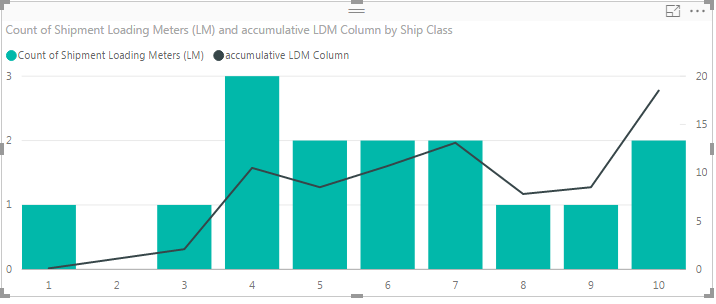
But, as you can see, i am doing something wrong here, since it is always displaying this chart:

chart.png


Any suggestions? Please explain me, what am i doing wrong here, since i dont understand these expressions at all.

Many thanks.

1 ACCEPTED SOLUTION
Eric_Zhang
Microsoft Employee
Microsoft Employee

@MarkoTheWhite

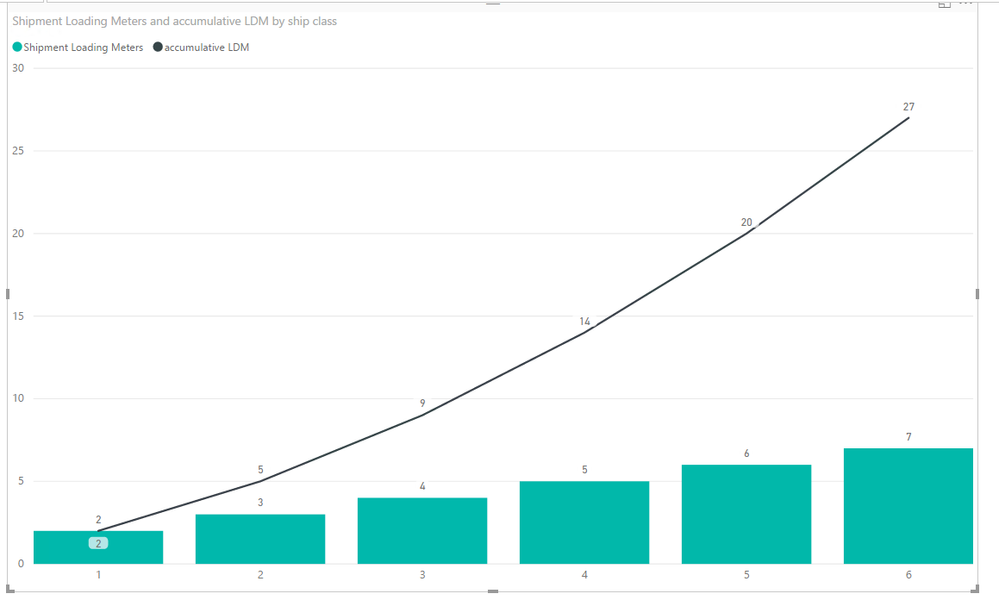
In you case, you may need a measure as below. See more in the attached pbix file.

accumulative LDM =
SUMX (
    FILTER (
        ALLSELECTED ( yourTable ),
        yourTable[ship class] <= MAX ( yourTable[ship class] )
    ),
    yourTable[Shipment Loading Meters]
)

Capture.PNG


View solution in original post

1 REPLY 1
Eric_Zhang
Microsoft Employee
Microsoft Employee

@MarkoTheWhite

In you case, you may need a measure as below. See more in the attached pbix file.

accumulative LDM =
SUMX (
    FILTER (
        ALLSELECTED ( yourTable ),
        yourTable[ship class] <= MAX ( yourTable[ship class] )
    ),
    yourTable[Shipment Loading Meters]
)

Capture.PNG


Helpful resources

Announcements
New to Fabric survey Carousel

New to Fabric Survey

If you have recently started exploring Fabric, we'd love to hear how it's going. Your feedback can help with product improvements.

Power BI DataViz World Championships carousel

Power BI DataViz World Championships - June 2026

A new Power BI DataViz World Championship is coming this June! Don't miss out on submitting your entry.

Join our Fabric User Panel

Join our Fabric User Panel

Share feedback directly with Fabric product managers, participate in targeted research studies and influence the Fabric roadmap.

March Power BI Update Carousel

Power BI Community Update - March 2026

Check out the March 2026 Power BI update to learn about new features.