cancel
Showing results for 
Search instead for 
Did you mean: 

Learn from the best! Meet the four finalists headed to the FINALS of the Power BI Dataviz World Championships! Register now

Reply
nroeder
Frequent Visitor

API setup authorization bearer.

I've followed all the different insturctions to setup the API. The one thing I cannot figure out is where and how to get the authorization code/string/bearer. I'm trying to connect my dataset to Retool. retool.com The only way I can get it to work is to copy the Authorization: Bearer from https://docs.microsoft.com/ example but this only works for a day and then it changes. I'm sure i'm missing something incredibly simple but i cannot figure it out. Any help would be appreciated. 

2 REPLIES 2
v-chenwuz-msft
Community Support
Community Support

Hi @nroeder ,


The access token will expire after an hour. So you should use script to refresh the token.

Refresh the access token in Power BI embedded analytics | Microsoft Docs

Then use the token in the headers for the rest api.


For more details, you can refer this post

Solved: REST API Get Access Token - Microsoft Power BI Community


Best Regards

Community Support Team _ chenwu zhu


If this post helps, then please consider Accept it as the solution to help the other members find it more quickly.


nroeder_0-1662470864826.jpeg


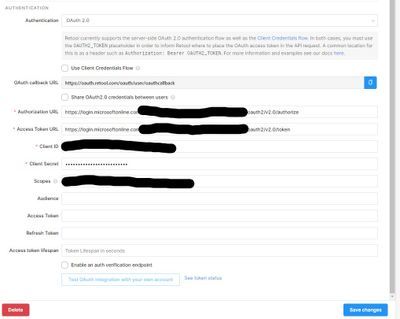
Thanks! I definetley think i'm on the right track but everything I find is based on coding. Here is the interface i'm trying to connect. Any idea?

Helpful resources

Announcements
Join our Fabric User Panel

Join our Fabric User Panel

Share feedback directly with Fabric product managers, participate in targeted research studies and influence the Fabric roadmap.

March Power BI Update Carousel

Power BI Community Update - March 2026

Check out the March 2026 Power BI update to learn about new features.