cancel
Showing results for 
Search instead for 
Did you mean: 

The Power BI Data Visualization World Championships is back! Get ahead of the game and start preparing now! Learn more

Reply
kirby
Frequent Visitor

API calls no longer working

Hi there


I have been using the auth URL below to authenticate against the Power BI API (Using Powershell) for months now and yesterday it just stopped working


https://login.microsoftonline.com/common/oauth2/token


I now receive the error:


The remote server returned an error: (400) Bad Request.


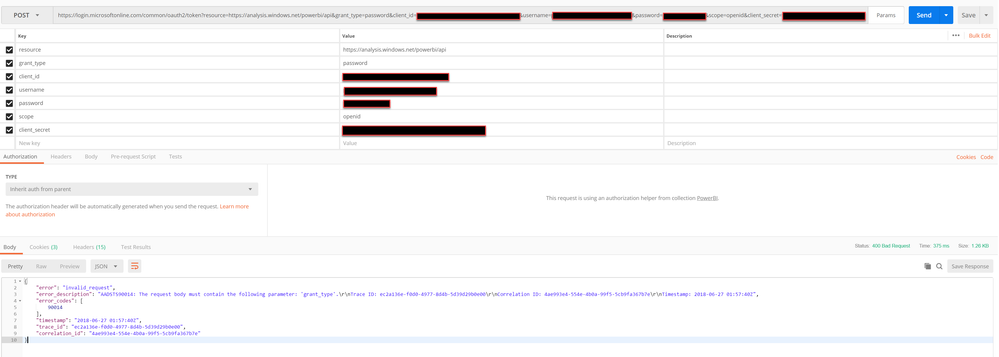
I have tried to debug the call in Postman and it appears the grant_type parameter is not being validated correctly. Even though it is specified, I always receive the error:


Power BI API Error.png


Please could this be investigated as none of my Power BI refreshes are currently running


Thanks a lot

1 ACCEPTED SOLUTION
v-jiascu-msft
Microsoft Employee
Microsoft Employee

Hi @kirby,


That might be the changes or the issues of AAD. According to the #use-the-authorization-code-to-request-an-access-token, the grant_type should be authorization_code. Please check it out. Please also refer to the below posts for the similar approaches.


1. https://community.powerbi.com/t5/Developer/programmatic-data-refresh-using-api/m-p/223051#M7045

2. https://community.powerbi.com/t5/Developer/Authentication-in-Powershell-and-API-to-update-a-dataset/...

3. https://docs.microsoft.com/en-us/power-bi/developer/walkthrough-push-data-get-token


Best Regards,

Dale

Community Support Team _ Dale
If this post helps, then please consider Accept it as the solution to help the other members find it more quickly.

View solution in original post

2 REPLIES 2
v-jiascu-msft
Microsoft Employee
Microsoft Employee

Hi @kirby,


That might be the changes or the issues of AAD. According to the #use-the-authorization-code-to-request-an-access-token, the grant_type should be authorization_code. Please check it out. Please also refer to the below posts for the similar approaches.


1. https://community.powerbi.com/t5/Developer/programmatic-data-refresh-using-api/m-p/223051#M7045

2. https://community.powerbi.com/t5/Developer/Authentication-in-Powershell-and-API-to-update-a-dataset/...

3. https://docs.microsoft.com/en-us/power-bi/developer/walkthrough-push-data-get-token


Best Regards,

Dale

Community Support Team _ Dale
If this post helps, then please consider Accept it as the solution to help the other members find it more quickly.

Hi Dale


Thanks a lot for the info. I did visit most of these sites yesterday but without any luck. I tried the same thing now and it seems to be working


Thanks again


Cheers

Helpful resources

Announcements
Power BI DataViz World Championships

Power BI Dataviz World Championships

The Power BI Data Visualization World Championships is back! Get ahead of the game and start preparing now!

December 2025 Power BI Update Carousel

Power BI Monthly Update - December 2025

Check out the December 2025 Power BI Holiday Recap!

FabCon Atlanta 2026 carousel

FabCon Atlanta 2026

Join us at FabCon Atlanta, March 16-20, for the ultimate Fabric, Power BI, AI and SQL community-led event. Save $200 with code FABCOMM.