cancel
Showing results for 
Search instead for 
Did you mean: 

Next up in the FabCon + SQLCon recap series: The roadmap for Microsoft SQL and Maximizing Developer experiences in Fabric. All sessions are available on-demand after the live show. Register now

Reply
Anonymous
Not applicable

API - Columns became rows

Edit: Solved, I was going about this the wrong way. Transpose columns before expanding rows and it works. Whoops 


First time trying to use an API directly into Power BI and ran into some issues, or maybe I'm just doing it wrong?

I'm getting data from Statistics Sweden (Swedish government agency) through this link.  Which I add as a "web" data source in Power BI.


What I want is a column for each of the categories with rows of values, like this:


regiontypetablecontent2020K12020K22020K32020K4
xza1174117216591232
xza29619688731004
xyb1116575469
xyb29411746118


But instead I get this:


codetextvaluetextselimination
Regionregion[List]TRUE
Hustyphustyp[List]TRUE
ContentsCodetabellinnehåll[List]null
Tidkvartal[List]null


And if I expand the [List] to new rows I just get a long list with the data in a single column like mentioned. 

Am I missing something in the previous "Applied Steps" in my query settings?

Thanks 

1 ACCEPTED SOLUTION
Anonymous
Not applicable

Thanks, I was doing it wrong...

If i Transpose the columns before expanding the lists it works. 

View solution in original post

2 REPLIES 2
v-lionel-msft
Community Support
Community Support

Hi @Anonymous ,


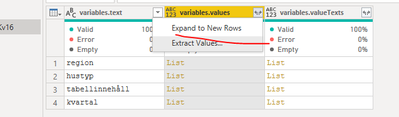
Try to connect to this data source and expanded the List. Then, transform the table.

v-lionel-msft_0-1620198781584.png


Best regards,
Lionel Chen

If this post helps, then please consider Accept it as the solution to help the other members find it more quickly.


Anonymous
Not applicable

Thanks, I was doing it wrong...

If i Transpose the columns before expanding the lists it works. 

Helpful resources

Announcements
New to Fabric survey Carousel

New to Fabric Survey

If you have recently started exploring Fabric, we'd love to hear how it's going. Your feedback can help with product improvements.

Power BI DataViz World Championships carousel

Power BI DataViz World Championships - June 2026

A new Power BI DataViz World Championship is coming this June! Don't miss out on submitting your entry.

Join our Fabric User Panel

Join our Fabric User Panel

Share feedback directly with Fabric product managers, participate in targeted research studies and influence the Fabric roadmap.

March Power BI Update Carousel

Power BI Community Update - March 2026

Check out the March 2026 Power BI update to learn about new features.