Join us at FabCon Atlanta from March 16 - 20, 2026, for the ultimate Fabric, Power BI, AI and SQL community-led event. Save $200 with code FABCOMM.
Register now!The Power BI Data Visualization World Championships is back! Get ahead of the game and start preparing now! Learn more
please click above link you will see the data. the items which we shown in RED COLOR(RED COLOR columns are output columns) need to write dax. after that show in table or matrix visual. please kindly share pbix file.
regards
dilip
Solved! Go to Solution.
Hi @pasupathi
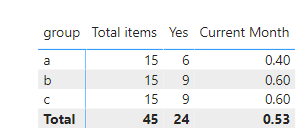
Create the follwoing 3 measures:
Total items = SUM('Table'[items])
Yes = CALCULATE([Total items],'Table'[yes/no] = "Y")
Current Month = DIVIDE( [Yes], [Total items])
This returns result below:
Regards
Miguel Félix
Proud to be a Super User!
Check out my blog: Power BI em PortuguêsHi @pasupathi
Create the follwoing 3 measures:
Total items = SUM('Table'[items])
Yes = CALCULATE([Total items],'Table'[yes/no] = "Y")
Current Month = DIVIDE( [Yes], [Total items])
This returns result below:
Regards
Miguel Félix
Proud to be a Super User!
Check out my blog: Power BI em PortuguêsCheck out the November 2025 Power BI update to learn about new features.
Advance your Data & AI career with 50 days of live learning, contests, hands-on challenges, study groups & certifications and more!