
cancel
Showing results for 
Search instead for 
Did you mean: 

The Power BI Data Visualization World Championships is back! Get ahead of the game and start preparing now! Learn more

Reply
Anonymous
Not applicable

windows authentication doesn't work in data flow

I have my table in powerbi desktop, and I want to put it to powerbi data flow. I simply copy the query and in the data flow:

1.PNG

then I get the following error:2.PNG


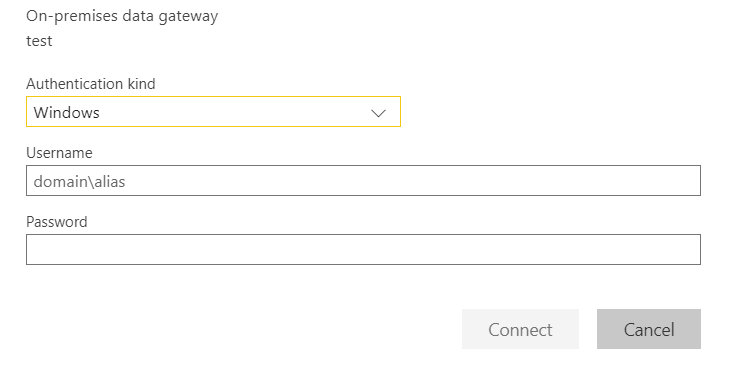
and then when I click on edit credintials, I have this: 3.PNG


Then no matter what I enter in the windows authentication, it doesn't work, I tried the following:

- my email

- my windows log_in

- AzureAD\myUsername

- fileserver\sharedfile\username

- I started my browser as 'run as an administrator'


none of them are working. Can someone tell me what is wrong, please !!!!!

1 ACCEPTED SOLUTION

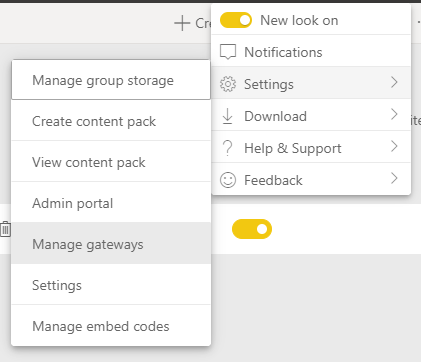
After installing the gateway with you account, you can go to configuration and Manage gateways like this:


image.png


There you can add a source and check if the autentication works. Once you manage to connect there you will be able to use the same credentials on dataflows.


If this post helps, then please consider Accept it as the solution to help the other members find it more quickly.

Happy to help!

LaDataWeb Blog

View solution in original post

6 REPLIES 6
ibarrau
Super User
Super User

Hi. You probably need an On Premise Data Gateway installed on the pc in order to connect DataFlows to an on premise data source like the csv with that path.

Then you can connect that way.


If this post helps, then please consider Accept it as the solution to help the other members find it more quickly.

Happy to help!

LaDataWeb Blog

Anonymous
Not applicable

@ibarrau 
I already installed a gateway

Is that gateway configured with the source (csv file) ?

You should type the same credentials you use for login your pc.


If this post helps, then please consider Accept it as the solution to help the other members find it more quickly.

Happy to help!

LaDataWeb Blog

Anonymous
Not applicable

@ibarrau 

how should I configure the gateway with (scv)format?

After installing the gateway with you account, you can go to configuration and Manage gateways like this:


image.png


There you can add a source and check if the autentication works. Once you manage to connect there you will be able to use the same credentials on dataflows.


If this post helps, then please consider Accept it as the solution to help the other members find it more quickly.

Happy to help!

LaDataWeb Blog

Anonymous
Not applicable

@ibarrau 
Oh my god!!!!!!!!
I can not believe that it is working !!!!!

Helpful resources

Announcements
Power BI DataViz World Championships

Power BI Dataviz World Championships

The Power BI Data Visualization World Championships is back! Get ahead of the game and start preparing now!

December 2025 Power BI Update Carousel

Power BI Monthly Update - December 2025

Check out the December 2025 Power BI Holiday Recap!

FabCon Atlanta 2026 carousel

FabCon Atlanta 2026

Join us at FabCon Atlanta, March 16-20, for the ultimate Fabric, Power BI, AI and SQL community-led event. Save $200 with code FABCOMM.