Huge last-minute discounts for FabCon Vienna from September 15-18, 2025
Supplies are limited. Contact info@espc.tech right away to save your spot before the conference sells out.
Get your discount- Power BI forums
- Get Help with Power BI
- Desktop
- Service
- Report Server
- Power Query
- Mobile Apps
- Developer
- DAX Commands and Tips
- Custom Visuals Development Discussion
- Health and Life Sciences
- Power BI Spanish forums
- Translated Spanish Desktop
- Training and Consulting
- Instructor Led Training
- Dashboard in a Day for Women, by Women
- Galleries
- Data Stories Gallery
- Themes Gallery
- Contests Gallery
- Quick Measures Gallery
- Notebook Gallery
- Translytical Task Flow Gallery
- TMDL Gallery
- R Script Showcase
- Webinars and Video Gallery
- Ideas
- Custom Visuals Ideas (read-only)
- Issues
- Issues
- Events
- Upcoming Events
Score big with last-minute savings on the final tickets to FabCon Vienna. Secure your discount
- Power BI forums
- Forums
- Get Help with Power BI
- Desktop
- Re: why isn't there a type option
- Subscribe to RSS Feed
- Mark Topic as New
- Mark Topic as Read
- Float this Topic for Current User
- Bookmark
- Subscribe
- Printer Friendly Page

- Mark as New
- Bookmark
- Subscribe
- Mute
- Subscribe to RSS Feed
- Permalink
- Report Inappropriate Content
why isn't there a type option
Hi,
I'm new to PowerBI. Maybe this a dumb question. But I did search everywhere and couldn't find a solution.
I have a time series column (freq=1day) "Report Date" as shown below:

I inserted a "line and clustered column chart". I picked "Report Date" as x-axis, "Total Cases" as "line volume", "Daily New Cases" as "column volume". Now the question is why can't I change data type of "Report Date" column? (Please see screenshot below)

In order to help clarify my question. Here is another powerbi dashboard. This is what I want:

There should be a "Type" option under "X axis" tab.
Thanks for any help or response!
Best,
-Y
Solved! Go to Solution.
- Mark as New
- Bookmark
- Subscribe
- Mute
- Subscribe to RSS Feed
- Permalink
- Report Inappropriate Content
Question solved. The solution is create a hierarchy.


- Mark as New
- Bookmark
- Subscribe
- Mute
- Subscribe to RSS Feed
- Permalink
- Report Inappropriate Content
Hi @Anonymous,
You can try to transfer data type in query editor as:
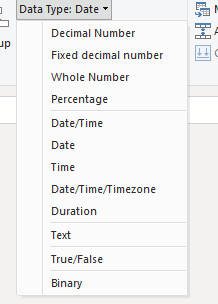
Best Regards,
Link
- Mark as New
- Bookmark
- Subscribe
- Mute
- Subscribe to RSS Feed
- Permalink
- Report Inappropriate Content
Thanks for your suggestion. But I've transferred data type to date before I post this question. There was no 'type' option.
-Y
- Mark as New
- Bookmark
- Subscribe
- Mute
- Subscribe to RSS Feed
- Permalink
- Report Inappropriate Content
I did transfer it before I post this question. But still I didn't find "type" option under X-axis. Am I missing something?


- Mark as New
- Bookmark
- Subscribe
- Mute
- Subscribe to RSS Feed
- Permalink
- Report Inappropriate Content
Hi,
Could you check whether the date your are trying to use is formatted as a date type? The option to switch the axis between the "continuous" and "categorical" type is only visible when a numerical or date type field is in the x-axis, since other values like texts cannot be distributed over a continuous axis. (e.g. 1,2,3,4,5,6 can be ordered continuous on an axis between 1 and 6. but abc, def, ghi, jkl cannot logically be distributed on an axis between abc and jkl). If the date is formatted as a text it will automatically interpret the values as categorical. example:
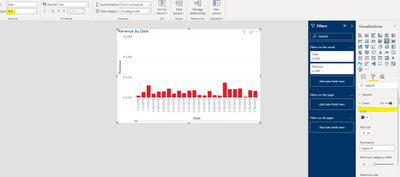
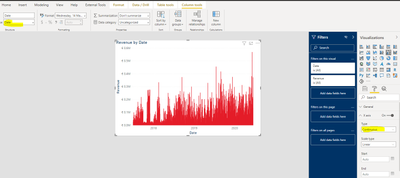
Best regards,
Tim
Did I answer your question? Mark my post as a solution!
Proud to be a Super User!
- Mark as New
- Bookmark
- Subscribe
- Mute
- Subscribe to RSS Feed
- Permalink
- Report Inappropriate Content
Thanks Tim for your response!
I do transfer it to date type.

- Mark as New
- Bookmark
- Subscribe
- Mute
- Subscribe to RSS Feed
- Permalink
- Report Inappropriate Content
Question solved. The solution is create a hierarchy.
Helpful resources

Power BI Monthly Update - August 2025
Check out the August 2025 Power BI update to learn about new features.

Fabric Community Update - August 2025
Find out what's new and trending in the Fabric community.

| User | Count |
|---|---|
| 64 | |
| 59 | |
| 47 | |
| 33 | |
| 32 |


| User | Count |
|---|---|
| 84 | |
| 74 | |
| 54 | |
| 50 | |
| 44 |


