cancel
Showing results for 
Search instead for 
Did you mean: 

Try your skills in the Power BI Dataviz World Championship! Round one ends June 26. Join now

Reply
Anonymous
Not applicable

week

hiii

i want display my data per weeks 

previously to represent data in months i used the below formula


Table =
ADDCOLUMNS (
FILTER ( VALUES ( Query1[Call Closed] ), [Call Closed] <> BLANK () ),
"Year", YEAR ( [Call Closed] ),
"Month", MONTH ( [Call Closed] ),
"MonthName", FORMAT ( [Call Closed], "MMMM" )
2 REPLIES 2
Anonymous
Not applicable

Hi @Anonymous ,

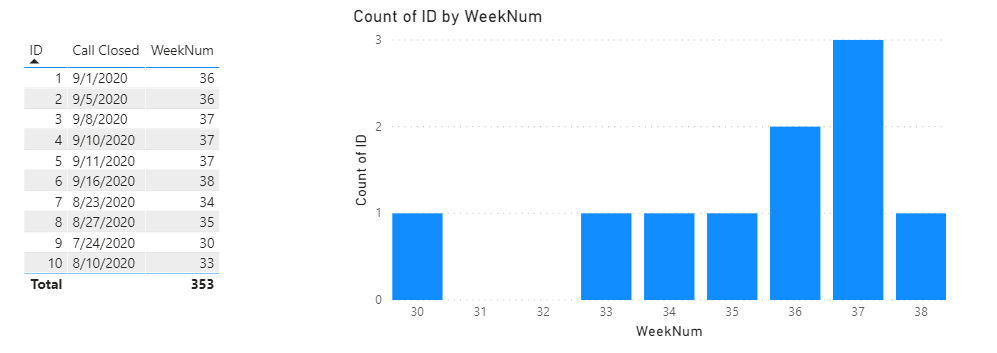
I’m not very sure about your requirement…Maybe you want to display weeknum?

WeekNum =

WEEKNUM ( 'Query1'[Call Closed], 2 )

9.17.6.1.png

Did I answer your question ? Please mark my reply as solution. Thank you very much.

If not, please upload some insensitive data samples and expected output.


Best Regards,

Eyelyn Qin

amitchandak
Super User
Super User

@Anonymous , for week refer my two blogs

https://medium.com/@amitchandak.1978/power-bi-wtd-questions-time-intelligence-4-5-98c30fab69d3
https://community.powerbi.com/t5/Community-Blog/Week-Is-Not-So-Weak-WTD-Last-WTD-and-This-Week-vs-La...


You need to have the following column in your calendar

Week Start date = 'Date'[Date]+-1*WEEKDAY('Date'[Date],2)+1
Week End date = 'Date'[Date]+ 7-1*WEEKDAY('Date'[Date],2)
Week Number = WEEKNUM([Date],2)
Week = if('Date'[Week Number]<10,'Date'[Year]*10 & 'Date'[Week Number],'Date'[Year]&'Date'[Week Number])
Week Rank = RANKX(all('Date'),'Date'[Week Start date],,ASC,Dense)
Week name = [Week Start date] & " to "& [Week End date]
Weekday = WEEKDAY([Date],2)
WeekDay Name = FORMAT([Date],"ddd")


And this can be the measure

This Week = CALCULATE(sum('order'[Qty]), FILTER(ALL('Date'),'Date'[Week Rank]=max('Date'[Week Rank])))
Last Week = CALCULATE(sum('order'[Qty]), FILTER(ALL('Date'),'Date'[Week Rank]=max('Date'[Week Rank])-1))
Last year Week= CALCULATE(sum('order'[Qty]), FILTER(ALL('Date'),'Date'[Week Rank]=(max('Date'[Week Rank]) -52)))

Share with Power BI Enthusiasts: Full Power BI Video (20 Hours) YouTube
Microsoft Fabric Series 60+ Videos YouTube
Microsoft Fabric Hindi End to End YouTube

Helpful resources

Announcements
Fabric Data Days is here Carousel

Data Days 2026

Don't miss out on Data Days, June 15 through August 7. Learn Fabric, Power BI, SQL, AI and more.

May Power BI Update Carousel

Power BI Monthly Update - May 2026

Check out the May 2026 Power BI update to learn about new features.

Power BI DataViz World Championships carousel

Power BI DataViz World Championships - June 2026

A new Power BI DataViz World Championship is coming this June! Don't miss out on submitting your entry.