Join us at FabCon Atlanta from March 16 - 20, 2026, for the ultimate Fabric, Power BI, AI and SQL community-led event. Save $200 with code FABCOMM.
Register now!The Power BI Data Visualization World Championships is back! Get ahead of the game and start preparing now! Learn more
Hi
I trying to build a report on intranet usage, which should show the number of page views by sites.
In the data below, I would like the to count the number of page views by site:
http://contoso.sharepoint.com/sites/intranet/ has 52 page views
http://contoso.sharepoint.com/sites/intranet/hr/ has 12 page views
http://contoso.sharepoint.com/sites/intranet/hr/handbook has 8 page views
http://contoso.sharepoint.com/sites/intranet/sales/ has 12 paes views
http://contoso.sharepoint.com/sites/intranet/hr/sales/team1/ has 4 pages views
etc..
Can this be done in PowerBi? How?
The data, I've got looks like this. I've got one line per pages view in a Azure SQL DB.
Solved! Go to Solution.
Hi @Torbenan,
You should first import above data into Power BI desktop.
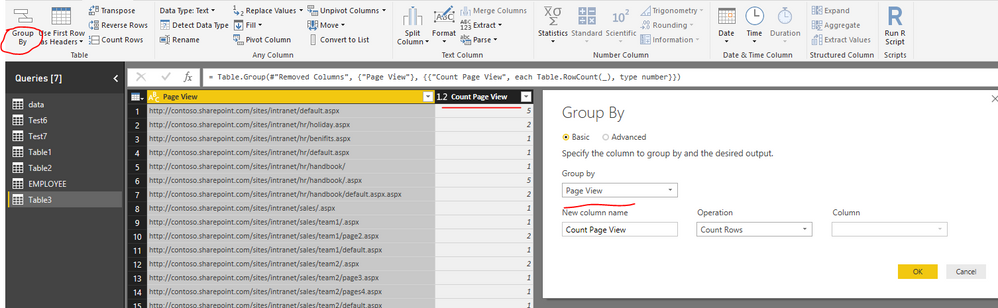
Then, to count page views per site, you can "Group by" data rows.
Regards,
Yuliana Gu
Hi @Torbenan,
You should first import above data into Power BI desktop.
Then, to count page views per site, you can "Group by" data rows.
Regards,
Yuliana Gu
The Power BI Data Visualization World Championships is back! Get ahead of the game and start preparing now!
Check out the November 2025 Power BI update to learn about new features.
| User | Count |
|---|---|
| 59 | |
| 43 | |
| 42 | |
| 23 | |
| 17 |
| User | Count |
|---|---|
| 190 | |
| 122 | |
| 96 | |
| 66 | |
| 47 |