Join us at FabCon Atlanta from March 16 - 20, 2026, for the ultimate Fabric, Power BI, AI and SQL community-led event. Save $200 with code FABCOMM.
Register now!The Power BI Data Visualization World Championships is back! Get ahead of the game and start preparing now! Learn more
hi,
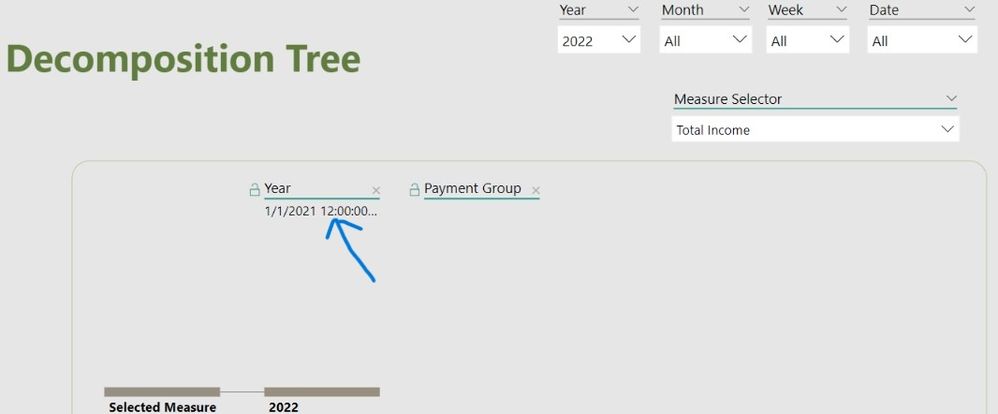
ref screenshot of the decomposition tree below -
the year in the tree header of this decomposition tree visual is not right. in other visuals, the year is shown correctly. kindly advise what to rectify it.
tks & krgds, -nik
Solved! Go to Solution.
Looks like you formatted a date as Year. You need an actual separate year column, as a number or text, not as a date.
Where does that year come from, an auto date/time hierarchy? Try using a dedicated calendar table.
Looks like you formatted a date as Year. You need an actual separate year column, as a number or text, not as a date.
tks again @lbendlin.
as suggested, i solved it by creating a new text-formatted year column by means of adding following line in in the calendar table:
The Power BI Data Visualization World Championships is back! Get ahead of the game and start preparing now!
| User | Count |
|---|---|
| 41 | |
| 39 | |
| 37 | |
| 29 | |
| 24 |
| User | Count |
|---|---|
| 122 | |
| 111 | |
| 83 | |
| 69 | |
| 68 |