cancel
Showing results for 
Search instead for 
Did you mean: 

Join the FabCon + SQLCon recap series. Up next: Power BI, Real-Time Intelligence, IQ and AI, and Data Factory take center stage. All sessions are available on-demand after the live show. Register now

Reply
Anonymous
Not applicable

vertical

Hi,


In recent build of Power BI, Option for connecting with Vertica is introduced. Problem that I am facing is that I am not getting an option for providing port on which my DB is running. What is the way of providing the port of DB if DB is not running on Port 5443.


Thanks!!!!

1 ACCEPTED SOLUTION
Anonymous
Not applicable

I found the solution. Vertica for now is not going to work on Port other than 5433.

View solution in original post

4 REPLIES 4
v-ljerr-msft
Microsoft Employee
Microsoft Employee

Hi @Anonymous,


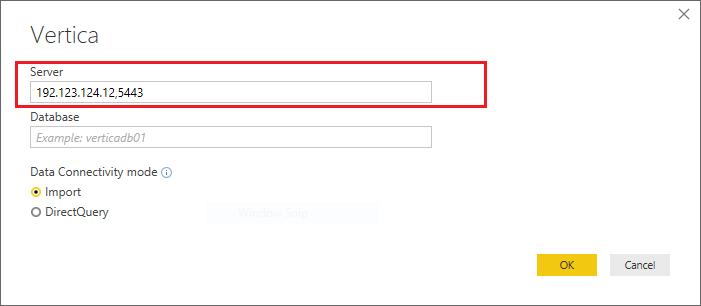
Could you try using sql server ip address, port number as the server name to see if it works? Smiley Happy


vertical.PNG


Regards

Anonymous
Not applicable

Vertica option is specifically meant for connecting Power BI with Vertica. I doubt SQL will work with Vertica DSN.


It seems to me Power BI only supports with deafult Port while connecting Vertica.

Anonymous
Not applicable

I found the solution. Vertica for now is not going to work on Port other than 5433.

Anonymous
Not applicable

Hi,


In recent build of Power BI, Option for connecting with Vertica is introduced. Problem that I am facing is that I am not getting an option for providing port on which my DB is running. What is the way of providing the port of DB if DB is not running on Port 5443.


Steps:

1) Open Power BI Version >> 2.51.4885 (October 2017)

2) Click on "Get Data" for making the connection.

3) On Get Data window, under "Other" tab, select option "Vertica (Beta)". This option is introduced in latest release.

4) Click on Connect Button.

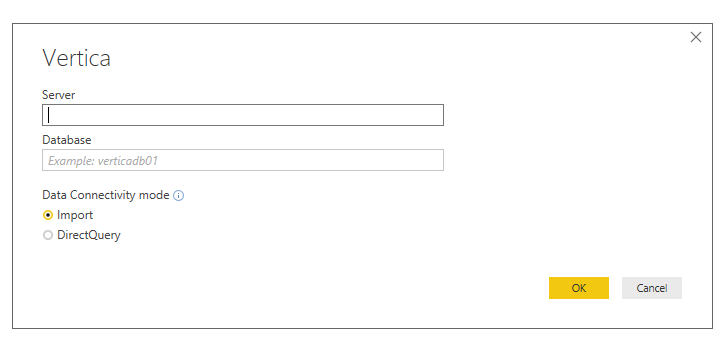
5) On the screen, Port option is missing.


Problem: My DB is not running on default port (i.e. 5443) therefore I am unable to connect with my DB. Below is the attached screenshot.


BI.png 

Please help.


Thanks!!!!

Helpful resources

Announcements
April Power BI Update Carousel

Power BI Monthly Update - April 2026

Check out the April 2026 Power BI update to learn about new features.

New to Fabric survey Carousel

New to Fabric Survey

If you have recently started exploring Fabric, we'd love to hear how it's going. Your feedback can help with product improvements.

Power BI DataViz World Championships carousel

Power BI DataViz World Championships - June 2026

A new Power BI DataViz World Championship is coming this June! Don't miss out on submitting your entry.

FabCon and SQLCon Highlights Carousel

FabCon &SQLCon Highlights

Experience the highlights from FabCon & SQLCon, available live and on-demand starting April 14th.