Join us at FabCon Atlanta from March 16 - 20, 2026, for the ultimate Fabric, Power BI, AI and SQL community-led event. Save $200 with code FABCOMM.
Register now!The Power BI Data Visualization World Championships is back! Get ahead of the game and start preparing now! Learn more
Hello
I have a value 'LocID' that appears in multiple tables in a SQL db I have.
At the moment I have to change the filter value multiple times in my quiries to get the
deired results.
I was hoping all I would need to do was setup a variable that I could change that would link to the different queries but
I cant figure that out.
Regards
Geoff
Solved! Go to Solution.
Think I have it
let
Source = Sql.Database("eu-ske-sql-03", "ANL_ProAss"),
dbo_OEE_FOR_BI = Source{[Schema="dbo",Item="OEE_FOR_BI"]}[Data],
#"Sorted Rows" = Table.Sort(dbo_OEE_FOR_BI,{{"ShiftDay", Order.Descending}}),
#"Filtered Rows" = Table.SelectRows(dbo_OEE_FOR_BI, each [LocId]=LineNumberPar)
in
#"Filtered Rows"
In this scenario, you can create that LocID as query parameter.
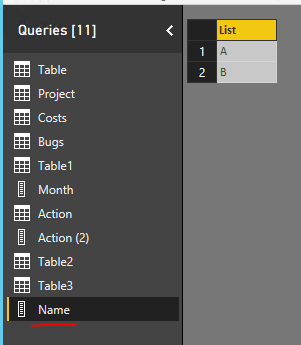
Import the LocID as a dataset. Select that column and "Add as new query".
It will generate a List with this column.
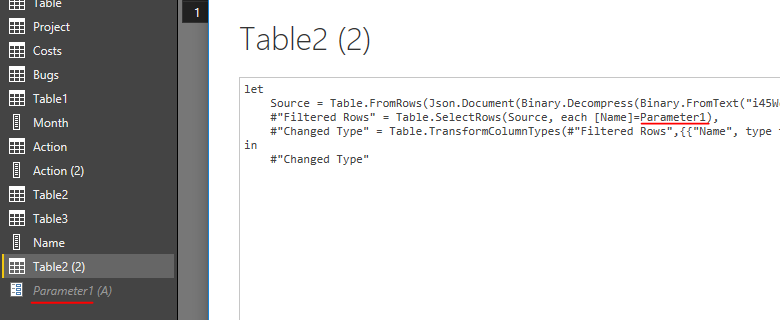
Create a Parameter with this List. Select "Query" in Suggested Values.
Then you can use this parameter in your Power Query.
Regards,
Thank you
99% complete ,just failing as to where to insert the parameter in the power query
Parameter is 'LineNumberPar'
Power Query is
let
Source = Sql.Database("server1", "ProApp"),
dbo_OEE_FOR_BI = Source{[Schema="dbo",Item="OEE_FOR_BI"]}[Data],
#"Sorted Rows" = Table.Sort(dbo_OEE_FOR_BI,{{"ShiftDay", Order.Descending}})
in
#"Sorted Rows"
Also the parameter now enables the selection between values "1,2,3,4,5,6,7,8,9" is there a way to include all these values also?
So this would enable the user to select individual lines or include all lines?
Regards
Geoff
Think I have it
let
Source = Sql.Database("eu-ske-sql-03", "ANL_ProAss"),
dbo_OEE_FOR_BI = Source{[Schema="dbo",Item="OEE_FOR_BI"]}[Data],
#"Sorted Rows" = Table.Sort(dbo_OEE_FOR_BI,{{"ShiftDay", Order.Descending}}),
#"Filtered Rows" = Table.SelectRows(dbo_OEE_FOR_BI, each [LocId]=LineNumberPar)
in
#"Filtered Rows"
The Power BI Data Visualization World Championships is back! Get ahead of the game and start preparing now!
| User | Count |
|---|---|
| 64 | |
| 43 | |
| 41 | |
| 32 | |
| 22 |
| User | Count |
|---|---|
| 200 | |
| 126 | |
| 103 | |
| 71 | |
| 54 |