Learn from the best! Meet the four finalists headed to the FINALS of the Power BI Dataviz World Championships! Register now
Hello Community,
Hope you are well.
I am struggling with dates comparison and I would appreciated if you could help me.
I try to build a table that will show the value delta of two projects, broken down per year/quarter, between two different dataset extractions.
Table 1 is a simplistic version of my dataset, and table 2 resembles what I would like to produce.
Table1 : Raw Data Table
| ExtractionDate | Project | Year | Quarter | Value |
| 01/09/2020 | PR1 | 2020 | 1 | 95 |
| 01/09/2020 | PR1 | 2020 | 2 | 81 |
| 01/09/2020 | PR1 | 2020 | 3 | 70 |
| 01/09/2020 | PR1 | 2020 | 4 | 40 |
| 01/09/2020 | PR2 | 2020 | 1 | 32 |
| 01/09/2020 | PR2 | 2020 | 2 | 74 |
| 01/09/2020 | PR2 | 2020 | 3 | 57 |
| 01/09/2020 | PR2 | 2020 | 4 | 65 |
| 01/12/2020 | PR1 | 2020 | 1 | 95 |
| 01/12/2020 | PR1 | 2020 | 2 | 81 |
| 01/12/2020 | PR1 | 2020 | 3 | 80 |
| 01/12/2020 | PR1 | 2020 | 4 | 69 |
| 01/12/2020 | PR2 | 2020 | 1 | 32 |
| 01/12/2020 | PR2 | 2020 | 2 | 74 |
| 01/12/2020 | PR2 | 2020 | 3 | 73 |
| 01/12/2020 | PR2 | 2020 | 4 | 80 |
Table2 : Outcome Table
| ExtractionDate | Project | Year | Quarter | Value | Value Delta |
| 01/12/2020 | PR1 | 2020 | 1 | 95 | 0 |
| 01/12/2020 | PR1 | 2020 | 2 | 81 | 0 |
| 01/12/2020 | PR1 | 2020 | 3 | 80 | 10 |
| 01/12/2020 | PR1 | 2020 | 4 | 69 | 29 |
| 01/12/2020 | PR2 | 2020 | 1 | 32 | 0 |
| 01/12/2020 | PR2 | 2020 | 2 | 74 | 0 |
| 01/12/2020 | PR2 | 2020 | 3 | 73 | 16 |
| 01/12/2020 | PR2 | 2020 | 4 | 80 | 15 |
Any help would really be appreciated.
Thank you,
George
Solved! Go to Solution.
Hi, @Anonymous
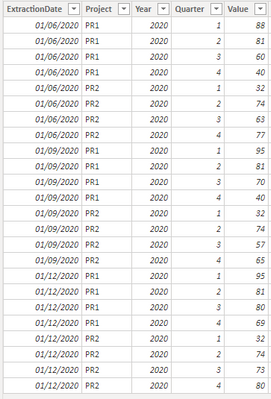
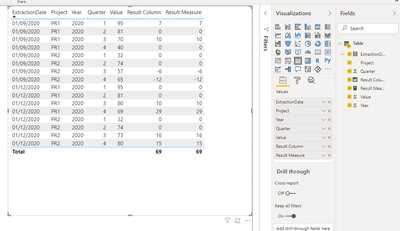
Based on your description, I created data to reproduce your scenario. The pbix file is attached in the end.
Table:
You may create a calculated column or a measure as below.
Calculated column:
Result Column =
var edate = [ExtractionDate]
var project = [Project]
var year = [Year]
var quarter = [Quarter]
var _lastdate =
CALCULATE(
MAX('Table'[ExtractionDate]),
FILTER(
ALL('Table'),
[ExtractionDate]<edate&&
[Project]=project&&
[Year]=year&&
[Quarter]=quarter
)
)
var _val =
CALCULATE(
SUM('Table'[Value]),
FILTER(
ALL('Table'),
[ExtractionDate]=_lastdate&&
[Project]=project&&
[Year]=year&&
[Quarter]=quarter
)
)
return
IF(
ISBLANK(_lastdate),
BLANK(),
[Value]-_val
)
Measure:
Result Measure =
var tab =
ADDCOLUMNS(
'Table',
"Result",
var edate = [ExtractionDate]
var project = [Project]
var year = [Year]
var quarter = [Quarter]
var _lastdate =
CALCULATE(
MAX('Table'[ExtractionDate]),
FILTER(
ALL('Table'),
[ExtractionDate]<edate&&
[Project]=project&&
[Year]=year&&
[Quarter]=quarter
)
)
var _val =
CALCULATE(
SUM('Table'[Value]),
FILTER(
ALL('Table'),
[ExtractionDate]=_lastdate&&
[Project]=project&&
[Year]=year&&
[Quarter]=quarter
)
)
return
IF(
ISBLANK(_lastdate),
BLANK(),
[Value]-_val
)
)
return
SUMX(
tab,
[Result]
)
Result:
Best Regards
Allan
If this post helps, then please consider Accept it as the solution to help the other members find it more quickly.
Hello Allan, @v-alq-msft
Thank you very much for your prompt reply.
Your proposal worked perfectly.
Please allow me two questions.
1) Can you please ellaborate more on the logic behind your solution? For example, I cannot really see at which point the subtraciton between the two extraction dates take place
2) Regarding the 1st extraction date, why are there results againt these rows?
Kind regards,
George
Hi, @Anonymous
First, we need to calculate last date where 'ExtractDate', 'Project', 'Year', 'Quarter' all equal to the corresponding value in current row.
var _lastdate =
CALCULATE(
MAX('Table'[ExtractionDate]),
FILTER(
ALL('Table'),
[ExtractionDate]<edate&&
[Project]=project&&
[Year]=year&&
[Quarter]=quarter
)
)
Then we may calculate the last value according to the last date where 'ExtractDate', 'Project', 'Year', 'Quarter' all equal to the corresponding value in current row.
var _val =
CALCULATE(
SUM('Table'[Value]),
FILTER(
ALL('Table'),
[ExtractionDate]=_lastdate&&
[Project]=project&&
[Year]=year&&
[Quarter]=quarter
)
)
Finally we need to calculate the difference between current value and last value when last value is not blank.
IF(
ISBLANK(_lastdate),
BLANK(),
[Value]-_val
)
Hope it helps for you to understand the logic.
Best Regards
Allan
If this post helps, then please consider Accept it as the solution to help the other members find it more quickly.
Hi, @Anonymous
Based on your description, I created data to reproduce your scenario. The pbix file is attached in the end.
Table:
You may create a calculated column or a measure as below.
Calculated column:
Result Column =
var edate = [ExtractionDate]
var project = [Project]
var year = [Year]
var quarter = [Quarter]
var _lastdate =
CALCULATE(
MAX('Table'[ExtractionDate]),
FILTER(
ALL('Table'),
[ExtractionDate]<edate&&
[Project]=project&&
[Year]=year&&
[Quarter]=quarter
)
)
var _val =
CALCULATE(
SUM('Table'[Value]),
FILTER(
ALL('Table'),
[ExtractionDate]=_lastdate&&
[Project]=project&&
[Year]=year&&
[Quarter]=quarter
)
)
return
IF(
ISBLANK(_lastdate),
BLANK(),
[Value]-_val
)
Measure:
Result Measure =
var tab =
ADDCOLUMNS(
'Table',
"Result",
var edate = [ExtractionDate]
var project = [Project]
var year = [Year]
var quarter = [Quarter]
var _lastdate =
CALCULATE(
MAX('Table'[ExtractionDate]),
FILTER(
ALL('Table'),
[ExtractionDate]<edate&&
[Project]=project&&
[Year]=year&&
[Quarter]=quarter
)
)
var _val =
CALCULATE(
SUM('Table'[Value]),
FILTER(
ALL('Table'),
[ExtractionDate]=_lastdate&&
[Project]=project&&
[Year]=year&&
[Quarter]=quarter
)
)
return
IF(
ISBLANK(_lastdate),
BLANK(),
[Value]-_val
)
)
return
SUMX(
tab,
[Result]
)
Result:
Best Regards
Allan
If this post helps, then please consider Accept it as the solution to help the other members find it more quickly.
A new Power BI DataViz World Championship is coming this June! Don't miss out on submitting your entry.
Share feedback directly with Fabric product managers, participate in targeted research studies and influence the Fabric roadmap.
| User | Count |
|---|---|
| 45 | |
| 34 | |
| 27 | |
| 15 | |
| 15 |
| User | Count |
|---|---|
| 58 | |
| 56 | |
| 38 | |
| 21 | |
| 21 |