cancel
Showing results for 
Search instead for 
Did you mean: 

Learn from the best! Meet the four finalists headed to the FINALS of the Power BI Dataviz World Championships! Register now

Reply
Dunner2020
Post Prodigy
Post Prodigy

using summarize table columns in filter statement

Hi there,


I am using summarize function to calculate the temporary table and then I want to calculate the rows count of that based on some condition. So I have written measure as follow:


Measure 1 = 
   

Var tempTable = SUMMARIZE('Table','Table'[Event ID],'Table'[Actual Event Start Time], 'Table'[EventType],'Table'[Status],"Distinct count",DISTINCTCOUNT('Table'[Actual Event Start Time ]))
RETURN
CALCULATE(
COUNTROWS(tempTable),
FILTER(tempTable,
tempTable[Actual Event Start Time (NZST)] >= [Current_RY_Yr_Strt] &&
'tempTable '[Actual Event Start Time (NZST)] < [Next_RY_Yr_Strt] &&
'tempTable '[ActualEvent Start Time (NZST)]<=Today() &&
'tempTable '[EventType]="3" && 'tempTable '[Status]="1"))
 
However, when I typed tempTable[Actual Event Start Time (NZST)] it underlines with red color and says can-not find [Actual Start Time (NZST).  Could anyone help me where I am making the mistake?
5 REPLIES 5
v-robertq-msft
Community Support
Community Support

Hi, @Dunner2020 

According to my test, if you used a variable to define a temporary table using Summarize() function, you can just enter”[” to get all the table you can use within the temporary table, and you can’t give the table name before the field name, like this:
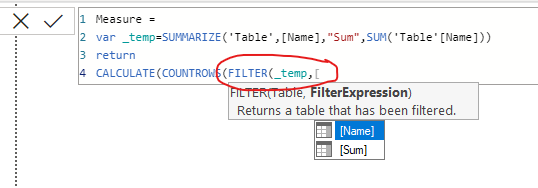
v-robertq-msft_0-1617347768372.png


Therefore, I suggest you to try to tranform your DAX formula like this:

Var tempTable = 
SUMMARIZE('Table','Table'[Event ID],'Table'[Actual Event Start Time], 'Table'[EventType],'Table'[Status],
"Distinct count",DISTINCTCOUNT('Table'[Actual Event Start Time ]))

RETURN

CALCULATE(

COUNTROWS(tempTable),

FILTER(tempTable,

[Actual Event Start Time] >= [Current_RY_Yr_Strt] &&

[Actual Event Start Time] < [Next_RY_Yr_Strt] &&

[ActualEvent Start Time]<=Today() &&

[EventType]="3" && [Status]="1"))


More info about Summarize() function in DAX


If this Dax formula still have a problem or it can’t achieve your requirement, you can post your sample pbix file (without sensitive data) and your expected result so that we can help in advance.

How to Get Your Question Answered Quickly 

Thank you very much!


Best Regards,

Community Support Team _Robert Qin

If this post helps, then please consider Accept it as the solution to help the other members find it more quickly.

@v-robertq-msft , thanks for your reply. I think we are almost there. I want to replace countrows with distinctcount. I want to perform calculation of distinctcount on [Actual Event Start Time] of tempTable. How could I apply the distinctcount on the tempTable?

Hi, @Dunner2020 

According to your requirement, I think you can use the DistinctCount() function and SelectedColumns() function in DAX to transform your formula, you can try to change the measure like this:

Var tempTable =
SUMMARIZE('Table','Table'[Event ID],'Table'[Actual Event Start Time], 'Table'[EventType],'Table'[Status],
"Distinct count",DISTINCTCOUNT('Table'[Actual Event Start Time ]))
RETURN
CALCULATE(
DistinctCount(SelectedColumns(
FILTER(tempTable,
[Actual Event Start Time] >= [Current_RY_Yr_Strt] &&
[Actual Event Start Time] < [Next_RY_Yr_Strt] &&
[ActualEvent Start Time]<=Today() &&
[EventType]="3" && [Status]="1"),”1”,[Actual Event Start Time])

More info about the DistinctCount() function in DAX


If this Dax formula still have a problem or it can’t achieve your requirement, you can post your sample pbix file (without sensitive data) and your expected result so that we can help in advance.

How to Get Your Question Answered Quickly 

Thank you very much!


Best Regards,

Community Support Team _Robert Qin

If this post helps, then please consider Accept it as the solution to help the other members find it more quickly.

Hi @v-robertq-msft , thanks for the reply. DistinctCount does not accept SelectedColumns function as an argument and shows red colour line underneath the SelectedColumns function.

amitchandak
Super User
Super User

@Dunner2020 , In the temp table I can see [Actual Event Start Time] not [Actual Event Start Time (NZST)]

why single quotes 'tempTable ' ? why not 'tempTable 


Can you please check that.


Why this can not be done without summarize?


You can use filter while adding data to summarize


example

SUMMARIZE(FILTER('Table',
Table[Actual Event Start Time (NZST)] >= [Current_RY_Yr_Strt] &&
'Table'[Actual Event Start Time (NZST)] < [Next_RY_Yr_Strt] &&
'Table'[ActualEvent Start Time (NZST)]<=Today() &&
'Table'[EventType]="3" && 'tempTable '[Status]="1"))

Share with Power BI Enthusiasts: Full Power BI Video (20 Hours) YouTube
Microsoft Fabric Series 60+ Videos YouTube
Microsoft Fabric Hindi End to End YouTube

Helpful resources

Announcements
Power BI DataViz World Championships carousel

Power BI DataViz World Championships - June 2026

A new Power BI DataViz World Championship is coming this June! Don't miss out on submitting your entry.

Join our Fabric User Panel

Join our Fabric User Panel

Share feedback directly with Fabric product managers, participate in targeted research studies and influence the Fabric roadmap.

March Power BI Update Carousel

Power BI Community Update - March 2026

Check out the March 2026 Power BI update to learn about new features.