cancel
Showing results for 
Search instead for 
Did you mean: 

The Power BI Data Visualization World Championships is back! It's time to submit your entry. Live now!

Reply
jppuam
Helper V
Helper V

using All except

all_except.pngHello,

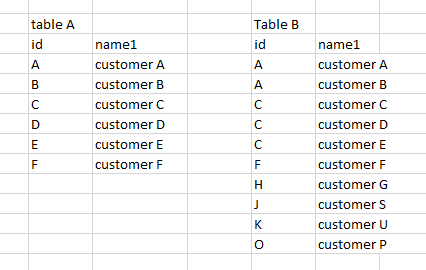
i want to do the following. I've values in 2 tables, like the image attached.


i've the table A on a slicer, and i want to do is when i filter the value A, it appears on a table visualization the other customer that doesnt exist on value A. It should appear the customer B


When i filter on the slicer the value C (customer C), it should appears on the table the other customers (D & E).


How can i do this ?


thank you,

JR


1 ACCEPTED SOLUTION
HotChilli
Community Champion
Community Champion

One way of doing this would be in Power Query.

Using 'Merge as New', make a new table by joining the two tables B and A on id and name1 (using Left Anti-Join) .  This will give you a table with only the rows from Table B that do not exist in Table A.

Close and Apply.

Create a relationship between Table A and the Merge table.

Put Table A in a slicer and Merge table (name1) in a Table.

View solution in original post

3 REPLIES 3
HotChilli
Community Champion
Community Champion

One way of doing this would be in Power Query.

Using 'Merge as New', make a new table by joining the two tables B and A on id and name1 (using Left Anti-Join) .  This will give you a table with only the rows from Table B that do not exist in Table A.

Close and Apply.

Create a relationship between Table A and the Merge table.

Put Table A in a slicer and Merge table (name1) in a Table.

But i've 2 tables distincts with that id (key).


Can i make a calculatedtable with DAX ?


thanks,

JR

Thanks HotChilli...your solution works perfect ! 😀

Helpful resources

Announcements
FabCon Atlanta 2026 carousel

FabCon Atlanta 2026

Join us at FabCon Atlanta, March 16-20, for the ultimate Fabric, Power BI, AI and SQL community-led event. Save $200 with code FABCOMM.