Hi @vjnvinod,
Based on your pbix file, If you want to achieve the output like append, I'm afraid that we may not join the table directly.
Here is a workaround, we could use UNION function to join the table. However, for your sceanrio, if we use UNION fucntion, the performance won't be well and it will show more rows. If your visual level filer is changed, you need to change the formula manully.
If you want to use UNION, you could refer to the formula below.
Table 3 =
UNION (
    SELECTCOLUMNS (
        FILTER (
            'Inbound',
            'Inbound'[HQArea] <> "Americas"
                && 'Inbound'[HQArea] <> "Asia-Pacific"
                && Inbound[HQArea] <> "EMEIA"
                && Inbound[HQArea] <> "Japan"
        ),
        "HQArea", 'Inbound'[HQArea],
        "TER_FYTD_USD", 'Inbound'[TER_FYTD_USD],
        "Growth.", [Growth.]
    ),
    SELECTCOLUMNS (
        FILTER (
            'Inbound',
            'Inbound'[Inbound] <> "Inbound from Americas"
                && 'Inbound'[Inbound] <> "Inbound from Asia-Pacific"
                && 'Inbound'[Inbound] <> "Inbound from EMEIA"
                && 'Inbound'[Inbound] <> "Inbound from Japan"
        ),
        "HQArea", 'Inbound'[DeliveryArea],
        "TER_FYTD_USD", 'Inbound'[TER_FYTD_USD],
        "Growth.", [Growth.]
    )
)
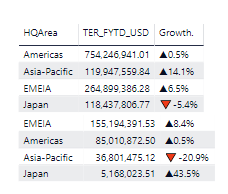
In another workaround, we could pin the two tables like below.
Best Regards,
Cherry
Community Support Team _ Cherry Gao
If this post helps, then please consider Accept it as the solution to help the other members find it more quickly.


