Get certified for free when you join Fabric Data Days 2026 and dive into Fabric, Power BI, SQL, AI, and other essential data skills.
Join nowJuly 7 - July 17 | Round 2 of the Power BI Dataviz World Championships. Don't miss your chance! Learn more
I have 3 sharepoint files all with a number of excel tables. All the tables are in the same format and layout, for each field sale to complete. the 3 sharepoint files cover different periods but the format and layout is consistant throughout.
I have used the Union formula to create 1 master database to build my dashboard from, however the union formula has mixed up the columns. As per my screenshot in the date column i have a few dates but also a few postcodes etc.
Is there anyway of redirecting each column so that the correct data is being selected?
Solved! Go to Solution.
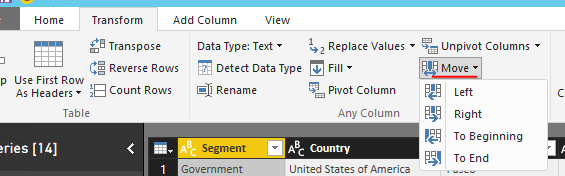
In DAX, when using UNION(), columns are combined by position in their respective tables. And column names in the return table will just match the column names in table_expression1. So make sure columns in two tables has same order. In your scenario, I suggest you go to Query Editor, "move" columns under Transform tab.
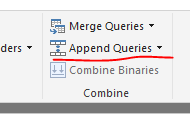
Then you can use "Append Query" to combine two datasets together.
Regards,
In DAX, when using UNION(), columns are combined by position in their respective tables. And column names in the return table will just match the column names in table_expression1. So make sure columns in two tables has same order. In your scenario, I suggest you go to Query Editor, "move" columns under Transform tab.
Then you can use "Append Query" to combine two datasets together.
Regards,
Join us in Barcelona for FabCon and SQLCon, the Fabric, Power BI, SQL, and AI community event. Save €200 with code FABCMTY200.
Join Fabric Data Days 2026: 60 days of free live/on-demand sessions, challenges, study groups, and certification opportunities.
| User | Count |
|---|---|
| 22 | |
| 22 | |
| 18 | |
| 16 | |
| 13 |
| User | Count |
|---|---|
| 63 | |
| 41 | |
| 40 | |
| 39 | |
| 38 |