cancel
Showing results for 
Search instead for 
Did you mean: 

Get Fabric certified for FREE! Don't miss your chance! Learn more

Reply
fiveone
Helper II
Helper II

union formula column section error

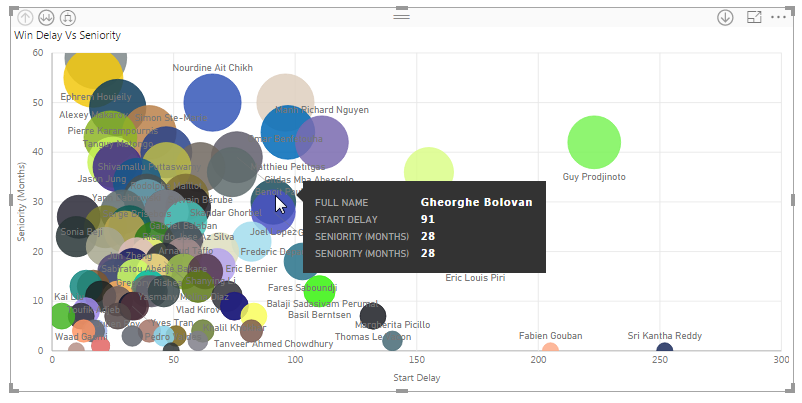
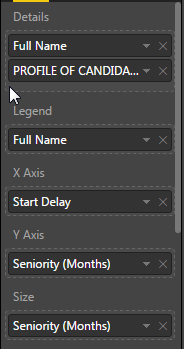
On the tooltip of a bubble chart I want to show both the name of the person and his seniority (=profile of candidate).


 I can show  seniority then name without problem2017-02-08 11_14_57-Staffing Dashboard - Power BI Desktop.png2017-02-08 11_15_11-Staffing Dashboard - Power BI Desktop.png

But as soon as I switch that order then the seniority just vanishes

 2017-02-08 11_15_30-Staffing Dashboard - Power BI Desktop.png2017-02-08 11_15_41-Staffing Dashboard - Power BI Desktop.png

The only way to bring it back is to put it in the tooltip section but then it shows at the end and it looks kind of stupid with the "First..." prefix.

2017-02-08 11_16_04-Staffing Dashboard - Power BI Desktop.png


Is that just a bug? what is its origin? Any known workaround?

1 ACCEPTED SOLUTION
v-ljerr-msft
Microsoft Employee
Microsoft Employee

Hi @fiveone,

The only way to bring it back is to put it in the tooltip section but then it shows at the end and it looks kind of stupid with the "First..." prefix.

This is the default behavior currently. As only scalar value(like a measure) can be set to the "Tooltips" field, when a table column is set to the field, an aggregation will be applied to that column. In your scenario, the "First" aggregation is applied to your "FROFILE OF CANDIDATE" column by default, so there is a prefix of "First" show on the tooptips.
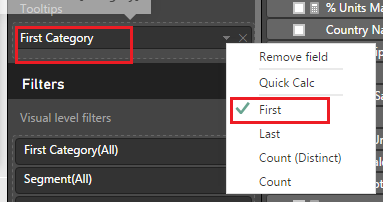
 

first1.PNG


In this scenario, I would suggest you to create a new measure with a name you want, to return the value of "FROFILE OF CANDIDATE", then set the measure to the Tooltips field. The formula below is for your reference.Smiley Happy

Profile_of_Candidate = FIRSTNONBLANK ( 'YourTableName'[FROFILE OF CANDIDATE], 1 )


Regards

View solution in original post

1 REPLY 1
v-ljerr-msft
Microsoft Employee
Microsoft Employee

Hi @fiveone,

The only way to bring it back is to put it in the tooltip section but then it shows at the end and it looks kind of stupid with the "First..." prefix.

This is the default behavior currently. As only scalar value(like a measure) can be set to the "Tooltips" field, when a table column is set to the field, an aggregation will be applied to that column. In your scenario, the "First" aggregation is applied to your "FROFILE OF CANDIDATE" column by default, so there is a prefix of "First" show on the tooptips.


first1.PNG


In this scenario, I would suggest you to create a new measure with a name you want, to return the value of "FROFILE OF CANDIDATE", then set the measure to the Tooltips field. The formula below is for your reference.Smiley Happy

Profile_of_Candidate = FIRSTNONBLANK ( 'YourTableName'[FROFILE OF CANDIDATE], 1 )


Regards

Helpful resources

Announcements
Join our Fabric User Panel

Join our Fabric User Panel

Share feedback directly with Fabric product managers, participate in targeted research studies and influence the Fabric roadmap.

January Power BI Update Carousel

Power BI Monthly Update - January 2026

Check out the January 2026 Power BI update to learn about new features.

FabCon Atlanta 2026 carousel

FabCon Atlanta 2026

Join us at FabCon Atlanta, March 16-20, for the ultimate Fabric, Power BI, AI and SQL community-led event. Save $200 with code FABCOMM.