Join us at FabCon Atlanta from March 16 - 20, 2026, for the ultimate Fabric, Power BI, AI and SQL community-led event. Save $200 with code FABCOMM.
Register now!The Power BI Data Visualization World Championships is back! Get ahead of the game and start preparing now! Learn more
Hello,
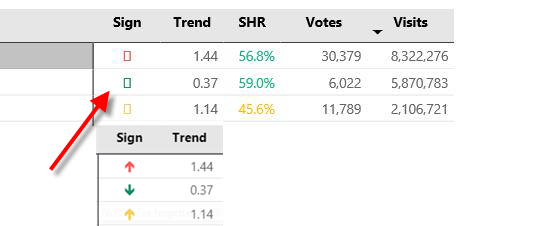
i have a problem with displaying unicode arrows. Namely, when published on PBI Service, I can see the arrows. However, other report users only see empty boxes instead of arrows (when hovered over the arrow shows up). I tried to change DAX code, but the problem still presist.
Do you have any idea how to solve it?
TrendArrow VisitsGlobal = SWITCH ( TRUE() , [Trend Visits Global] > 1 , UNICHAR(129145), [Trend Visits Global] > 0 , UNICHAR(129147), "" )
thanks
Solved! Go to Solution.
this should be helpful
https://docs.microsoft.com/en-us/power-bi/supported-languages-countries-regions#choose-the-locale-fo...
https://docs.microsoft.com/en-us/power-bi/supported-languages-countries-regions#choose-the-language-...
can it be related to the locale? or is it the same for both of you?
Hi @Stachu,
It can be related to locale, because my users are mostly in USA and I am in Europe (Czech Republic).
i am seeing it normaly. but they don't.
What can i do in this case?
this should be helpful
https://docs.microsoft.com/en-us/power-bi/supported-languages-countries-regions#choose-the-locale-fo...
https://docs.microsoft.com/en-us/power-bi/supported-languages-countries-regions#choose-the-language-...
The Power BI Data Visualization World Championships is back! Get ahead of the game and start preparing now!
| User | Count |
|---|---|
| 40 | |
| 35 | |
| 34 | |
| 31 | |
| 27 |
| User | Count |
|---|---|
| 135 | |
| 102 | |
| 67 | |
| 65 | |
| 56 |