Don't miss your chance to take exam DP-600 or DP-700 on us!
Request nowLearn from the best! Meet the four finalists headed to the FINALS of the Power BI Dataviz World Championships! Register now
Is it possible to activate a Bookmark, simply by hovering with your cursor over the image, the same image that acitivates the bookmark once its clicked upon?
Solved! Go to Solution.
Hi @hkillen,
Bookmark can’t support what you want to realize. You can submit your idea to power bi ideas website. Ideas (powerbi.com)
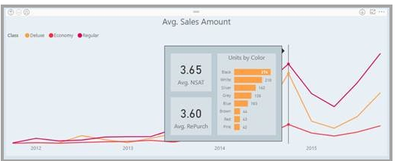
Perhaps you could consider using tooltip, which allows you to hover over a view and have the corresponding image appear when you set it. Like the following shows:
Through this doc to learn more about this function: Create report tooltip pages in Power BI - Power BI | Microsoft Docs
Best regards,
Community Support Team Selina zhu
If this post helps, then please consider Accept it as the solution to help the other members find it more quickly
Hi @hkillen,
Bookmark can’t support what you want to realize. You can submit your idea to power bi ideas website. Ideas (powerbi.com)
Perhaps you could consider using tooltip, which allows you to hover over a view and have the corresponding image appear when you set it. Like the following shows:
Through this doc to learn more about this function: Create report tooltip pages in Power BI - Power BI | Microsoft Docs
Best regards,
Community Support Team Selina zhu
If this post helps, then please consider Accept it as the solution to help the other members find it more quickly
Hi,
As I know, the Bookmark is activating on the action and needs to declare it in the Action feature in Button.
https://docs.microsoft.com/en-us/power-bi/create-reports/desktop-bookmarks?tabs=powerbi-desktop
No, that is not possible currently.
Share feedback directly with Fabric product managers, participate in targeted research studies and influence the Fabric roadmap.
Check out the February 2026 Power BI update to learn about new features.
| User | Count |
|---|---|
| 50 | |
| 40 | |
| 37 | |
| 14 | |
| 14 |
| User | Count |
|---|---|
| 85 | |
| 69 | |
| 37 | |
| 29 | |
| 27 |