cancel
Showing results for 
Search instead for 
Did you mean: 

July 7 - July 17 | Round 2 of the Power BI Dataviz World Championships. Don't miss your chance! Learn more

Reply
nntnga08
Regular Visitor

undefined

Hi everyone,

I'm a new power BI, so I need your support.

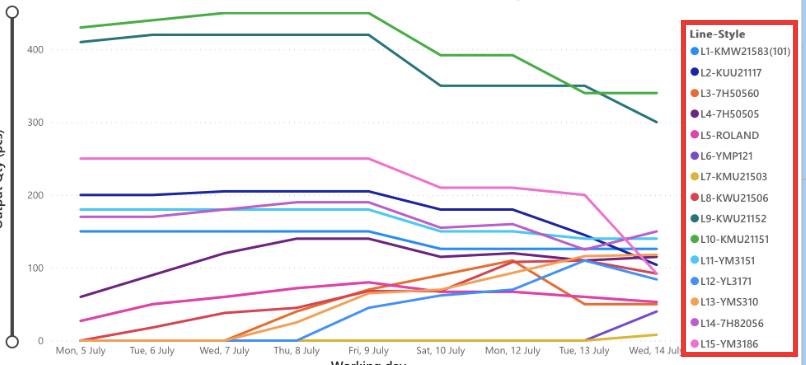
When I use power BI desktop, I click on any item of Legend (pls see the pic, I marked red at "Line-Style"), its line will be outstanded (other lines are blurred). So I can see which item I wanna check.

However, when I published this report on power bi online & sharepoint, when I click on any item of legend, its line isn't outstanded & other lines aren't blurred anymore.


Could you please help? Thank you so much!!

Screen Shot 2021-07-30 at 10.29.32 PM.png


1 ACCEPTED SOLUTION
v-henryk-mstf
Community Support
Community Support

Hi @nntnga08 ,


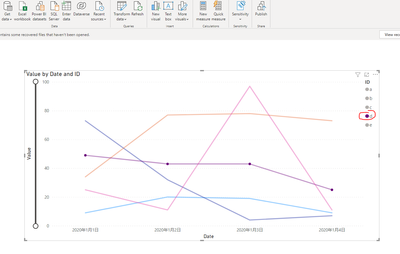
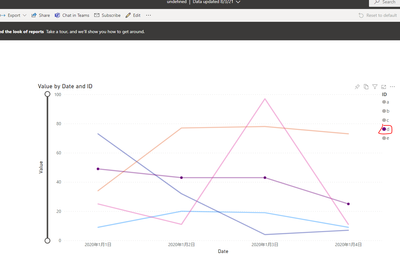
According to your description, I did a test. After publishing, click on the chart column to highlight the selected line. The reference is as follows:

vhenrykmstf_0-1627979977095.png

publish to service:

vhenrykmstf_1-1627980008895.png

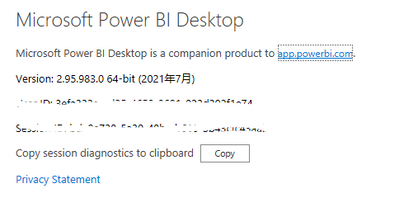
Try to download the latest version of powerbi desktop, then republish to service, and observe the result.

vhenrykmstf_2-1627980208102.png

You can also continue to pay attention to the issue of the situation, I hope it will help you.

Legend Highlight not working in Power BI service - Microsoft Power BI Community


If the problem is still not resolved, please provide detailed error information screenshoot and let me know immediately. Looking forward to your reply.


Best Regards,
Henry


If this post helps, then please consider Accept it as the solution to help the other members find it more quickly.

View solution in original post

2 REPLIES 2
v-henryk-mstf
Community Support
Community Support

Hi @nntnga08 ,


According to your description, I did a test. After publishing, click on the chart column to highlight the selected line. The reference is as follows:

vhenrykmstf_0-1627979977095.png

publish to service:

vhenrykmstf_1-1627980008895.png

Try to download the latest version of powerbi desktop, then republish to service, and observe the result.

vhenrykmstf_2-1627980208102.png

You can also continue to pay attention to the issue of the situation, I hope it will help you.

Legend Highlight not working in Power BI service - Microsoft Power BI Community


If the problem is still not resolved, please provide detailed error information screenshoot and let me know immediately. Looking forward to your reply.


Best Regards,
Henry


If this post helps, then please consider Accept it as the solution to help the other members find it more quickly.

Greg_Deckler
Community Champion
Community Champion

@nntnga08 You could check the Issues forum here:

https://community.powerbi.com/t5/Issues/idb-p/Issues

And if it is not there, then you could post it.

If you have Pro account you could try to open a support ticket. If you have a Pro account it is free. Go to https://support.powerbi.com. Scroll down and click "CREATE SUPPORT TICKET".


Follow on LinkedIn
@ me in replies or I'll lose your thread!!!
Instead of a Kudo, please vote for this idea
Become an expert!: Enterprise DNA
External Tools: MSHGQM
YouTube Channel!: Microsoft Hates Greg
Latest book!:
DAX For Humans

DAX is easy, CALCULATE makes DAX hard...

Helpful resources

Announcements
FabCon and SQLCon Barcelona 2026

FabCon & SQLCon – Barcelona 2026

Join us in Barcelona for FabCon and SQLCon, the Fabric, Power BI, SQL, and AI community event. Save €200 with code FABCMTY200.

60 days of Data Days Carousel

Data Days 2026

Join Fabric Data Days 2026: 60 days of free live/on-demand sessions, challenges, study groups, and certification opportunities.

Power BI DataViz World Championships carousel

Power BI DataViz World Championships - June 2026

A new Power BI DataViz World Championship is coming this June! Don't miss out on submitting your entry.