cancel
Showing results for 
Search instead for 
Did you mean: 

Did you hear? There's a new SQL AI Developer certification (DP-800). Start preparing now and be one of the first to get certified. Register now

Reply
tejaswi08
Regular Visitor

undefined

Hi , 


I am trying to achieve something and finding few difficulties in it. Any suggestions/help on it would help me a lot.


I have a date slicer(to select year) and a line chart showing metric value(month wise, having year in legend). Expectation is to have 2 years value (Selected & Previous year) from the year selected from the slicer. 


Eg; If I select 2017 in the slicer. Line chart must show value for 2016 & 2017 month wise.


I have basically calculated the metric value as below,


start_date = max(date)

end_date = FIRSTDATE( DATEADD( [date],-1,YEAR))  (OR) 

Value_2years = CALCULATE( SUM([Value]) , DATESBETWEEN( [Date] , [start_date] , [end_date] ) )


When I see the value alone or with some other dimension , it is working good. But when I see it along with date(which is in the slicer) only one year data is getting popuated.


The input from the slicer was taken to calculate start and end date on fly. But we dont need  that input to filter visual.


Is there any work around for this?


Thanks in Advance!

1 ACCEPTED SOLUTION
Anonymous
Not applicable

Hi @tejaswi08,

In your scenario, firstly, create a Year table listing years(2011,2012,2013,2014,2015,2016,2017…), but don’t create any relationship between this Year table and your original table.

Secondly, in your original table(take sales table for example), create a year column using following DAX.

Year = YEAR(Sales[DateKey])

Then create a measure in your original table using DAX below.

CheckMeasure = IF(MAX(Sales[Year])>(MAX(Year[Year])-2) && MAX(Sales[Year])<=MAX(Year[Year]),1,0)

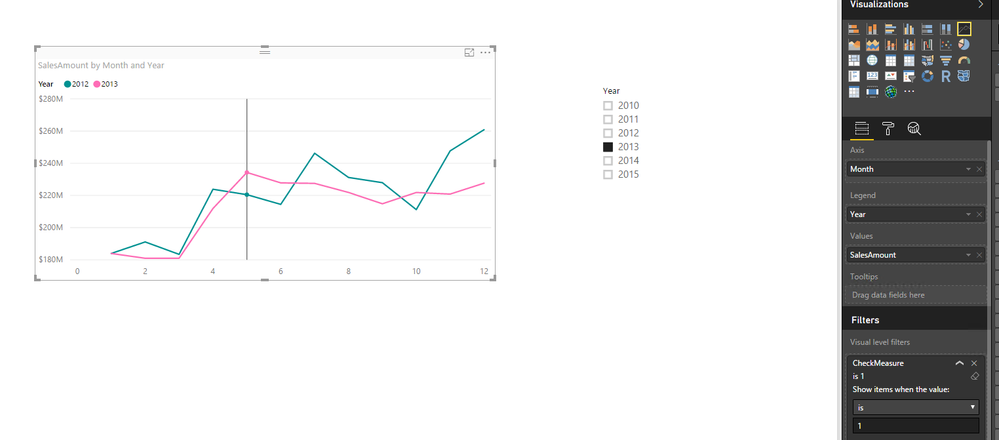
Thirdly, create a slicer using your Year table, and drag the CheckMeasure to the Visual level filters of your Line chart and filter the measure to 1 only. This way, when you select 2017 in the slicer, Line chart will show value for 2016 & 2017. You can review the following example for more details.
1.PNG


Thanks,
Lydia Zhang

View solution in original post

1 REPLY 1
Anonymous
Not applicable

Hi @tejaswi08,

In your scenario, firstly, create a Year table listing years(2011,2012,2013,2014,2015,2016,2017…), but don’t create any relationship between this Year table and your original table.

Secondly, in your original table(take sales table for example), create a year column using following DAX.

Year = YEAR(Sales[DateKey])

Then create a measure in your original table using DAX below.

CheckMeasure = IF(MAX(Sales[Year])>(MAX(Year[Year])-2) && MAX(Sales[Year])<=MAX(Year[Year]),1,0)

Thirdly, create a slicer using your Year table, and drag the CheckMeasure to the Visual level filters of your Line chart and filter the measure to 1 only. This way, when you select 2017 in the slicer, Line chart will show value for 2016 & 2017. You can review the following example for more details.
1.PNG


Thanks,
Lydia Zhang

Helpful resources

Announcements
April Power BI Update Carousel

Power BI Monthly Update - April 2026

Check out the April 2026 Power BI update to learn about new features.

Fabric SQL PBI Data Days

Data Days 2026 coming soon!

Sign up to receive a private message when registration opens and key events begin.

New to Fabric survey Carousel

New to Fabric Survey

If you have recently started exploring Fabric, we'd love to hear how it's going. Your feedback can help with product improvements.

Power BI DataViz World Championships carousel

Power BI DataViz World Championships - June 2026

A new Power BI DataViz World Championship is coming this June! Don't miss out on submitting your entry.