cancel
Showing results for 
Search instead for 
Did you mean: 

Learn from the best! Meet the four finalists headed to the FINALS of the Power BI Dataviz World Championships! Register now

Reply
Sue
Frequent Visitor

undefined

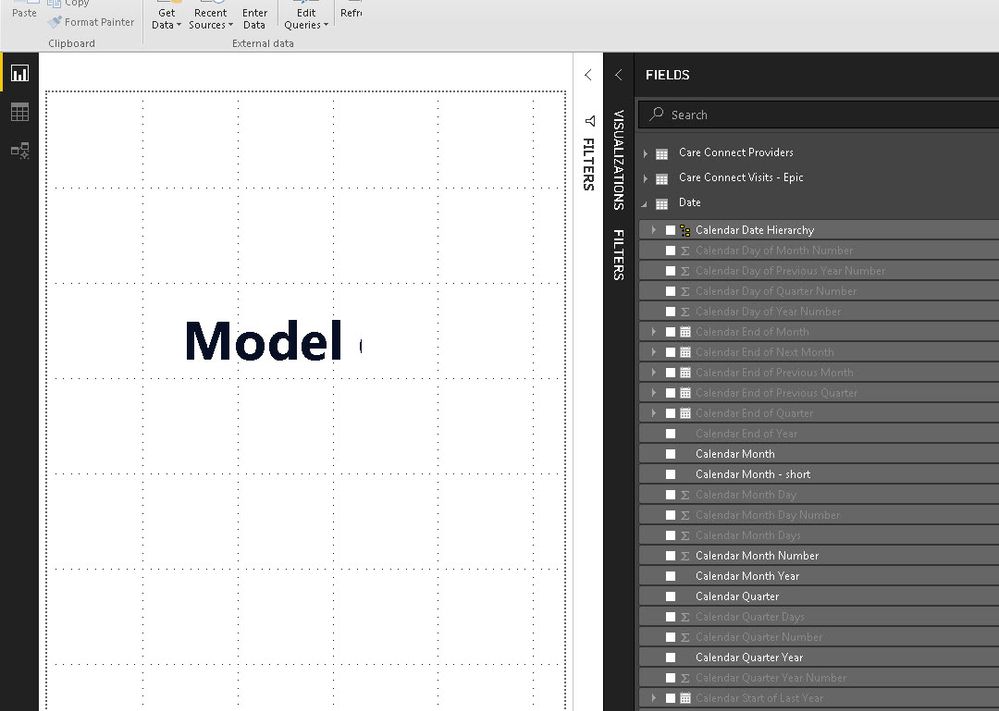
Since the latest update of Power BI, one of our hidden columns not hiddenhidden columns not hiddenpbix files is showing hidden folders grayed out in the report view rather than being hidden. Why is this and how can I fix it?

1 ACCEPTED SOLUTION
AkhilAshok
Solution Sage
Solution Sage

Just click on the 3 dots besides Date table and untick View Hidden

View solution in original post

1 REPLY 1
AkhilAshok
Solution Sage
Solution Sage

Just click on the 3 dots besides Date table and untick View Hidden

Helpful resources

Announcements
Power BI DataViz World Championships carousel

Power BI DataViz World Championships - June 2026

A new Power BI DataViz World Championship is coming this June! Don't miss out on submitting your entry.

Join our Fabric User Panel

Join our Fabric User Panel

Share feedback directly with Fabric product managers, participate in targeted research studies and influence the Fabric roadmap.

March Power BI Update Carousel

Power BI Community Update - March 2026

Check out the March 2026 Power BI update to learn about new features.