cancel
Showing results for 
Search instead for 
Did you mean: 

Learn from the best! Meet the four finalists headed to the FINALS of the Power BI Dataviz World Championships! Register now

Reply
pstaggers
Advocate II
Advocate II

undefined

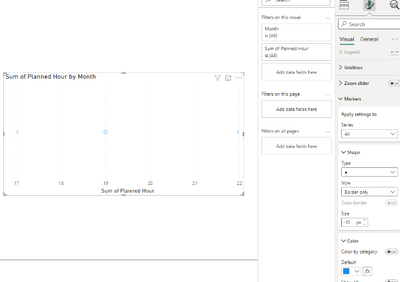
Is there a way to change the marker style on scatterplots to "unfilled"?  The style option is grayed out and defaulted to "fill only".

Scatterplot Marker Style Option Grayed Out.JPG

2 REPLIES 2
Anonymous
Not applicable

Hi @pstaggers ,


After my testing did not have the same issue, please check the fields of the scatter plot and if Power BI dsektop is upgraded to the latest version.

vtangjiemsft_0-1667891895329.png


You can refer to the following documents that may be helpful to you:

Scatter, bubble, and dot plot charts in Power BI - Power BI | Microsoft Learn

How To Use Scatter Charts in Power BI - Foresight BI - Achieve More With Less

Power BI Scatter Chart: Conditional Formatting - Enterprise DNA


Best Regards,

Neeko Tang

If this post helps, then please consider Accept it as the solution to help the other members find it more quickly. 

Ttaylor9870
Helper III
Helper III

Can you show an example of the plot? You have either turned a format visual slider off or it doesn't work with the fields you have inputted into your scatter plot.

Helpful resources

Announcements
Join our Fabric User Panel

Join our Fabric User Panel

Share feedback directly with Fabric product managers, participate in targeted research studies and influence the Fabric roadmap.

February Power BI Update Carousel

Power BI Monthly Update - February 2026

Check out the February 2026 Power BI update to learn about new features.

FabCon Atlanta 2026 carousel

FabCon Atlanta 2026

Join us at FabCon Atlanta, March 16-20, for the ultimate Fabric, Power BI, AI and SQL community-led event. Save $200 with code FABCOMM.