cancel
Showing results for 
Search instead for 
Did you mean: 

Learn from the best! Meet the four finalists headed to the FINALS of the Power BI Dataviz World Championships! Register now

Reply
YasserGaber
New Member

undefined

I want to replace null value in the column with the average value of previous value and next value ,. How can I achieve this?

1 ACCEPTED SOLUTION
Anonymous
Not applicable

Hi @YasserGaber ,


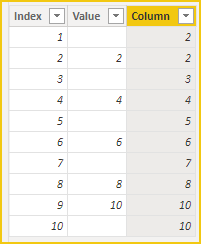
If there are no consecutive null values, try this calculated column.

Column = 
VAR _value = 'Table'[Value]
VAR _avg =
    AVERAGEX (
        FILTER (
            'Table',
            'Table'[Index]
                >= EARLIER ( 'Table'[Index] ) - 1
                && 'Table'[Index]
                    <= EARLIER ( 'Table'[Index] ) + 1
        ),
        'Table'[Value]
    )
VAR _result =
    IF ( 'Table'[Value] <> BLANK (), 'Table'[Value], _avg )
RETURN
    _result

vcgaomsft_0-1655791795079.png

Attached PBIX file for reference.


Best Regards,
Gao

Community Support Team


If there is any post helps, then please consider Accept it as the solution to help the other members find it more quickly. If I misunderstand your needs or you still have problems on it, please feel free to let us know. Thanks a lot!

How to get your questions answered quickly -- How to provide sample data

View solution in original post

2 REPLIES 2
Anonymous
Not applicable

Hi @YasserGaber ,


If there are no consecutive null values, try this calculated column.

Column = 
VAR _value = 'Table'[Value]
VAR _avg =
    AVERAGEX (
        FILTER (
            'Table',
            'Table'[Index]
                >= EARLIER ( 'Table'[Index] ) - 1
                && 'Table'[Index]
                    <= EARLIER ( 'Table'[Index] ) + 1
        ),
        'Table'[Value]
    )
VAR _result =
    IF ( 'Table'[Value] <> BLANK (), 'Table'[Value], _avg )
RETURN
    _result

vcgaomsft_0-1655791795079.png

Attached PBIX file for reference.


Best Regards,
Gao

Community Support Team


If there is any post helps, then please consider Accept it as the solution to help the other members find it more quickly. If I misunderstand your needs or you still have problems on it, please feel free to let us know. Thanks a lot!

How to get your questions answered quickly -- How to provide sample data

Daryl-Lynch-Bzy
Community Champion
Community Champion

hi @YasserGaber - using Power Query, you can add 3 index columns.  the 1st starts at zero, 2nd starts at 1, and then 3rd starts at 2.   At this point use Table.Buffer().   This buffered table can be joined twice.  The first join is between the 2nd index ( row x ) and 1st Index ( i.e. row x +1 ), the second join is between 2nd Index ( row x ) and the 3nd Index (i.e. row x - 1).  You can now expand to have 3 amount columns - Current Row Value, Next Row Value and Previous Row Value.   Then have an If statement like:

 if [Current Row Value] <> null then [Current Row Value] else List.Average( { [Next Row Value] , [Previous Row Value] } )  


Helpful resources

Announcements
Power BI DataViz World Championships carousel

Power BI DataViz World Championships - June 2026

A new Power BI DataViz World Championship is coming this June! Don't miss out on submitting your entry.

Join our Fabric User Panel

Join our Fabric User Panel

Share feedback directly with Fabric product managers, participate in targeted research studies and influence the Fabric roadmap.

March Power BI Update Carousel

Power BI Community Update - March 2026

Check out the March 2026 Power BI update to learn about new features.