Share feedback directly with Fabric product managers, participate in targeted research studies and influence the Fabric roadmap.
Sign up nowGet Fabric certified for FREE! Don't miss your chance! Learn more
One question, the title option has several options, normal, title2, title3, what are they for?
Solved! Go to Solution.
Hi @jpaz ,
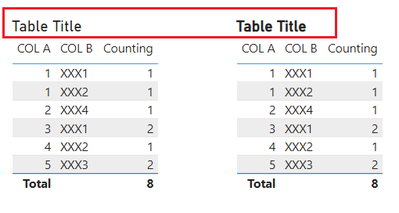
It is a new title functionality added to define the type of title text - Normal, title 2, title 3 etc...
These formats are similar to our word file designs.
Hi @jpaz
It is used to change the title format. You will find the difference when you publish the report to Power BI Service and view it in reading mode. In Power BI Desktop, it doesn't show any change when you switch the options.
Hope this helps.
Best Regards,
Community Support Team _ Jing
If this post helps, please Accept it as Solution to help other members find it.
Hi @jpaz
It is used to change the title format. You will find the difference when you publish the report to Power BI Service and view it in reading mode. In Power BI Desktop, it doesn't show any change when you switch the options.
Hope this helps.
Best Regards,
Community Support Team _ Jing
If this post helps, please Accept it as Solution to help other members find it.
Hi @jpaz ,
It is a new title functionality added to define the type of title text - Normal, title 2, title 3 etc...
These formats are similar to our word file designs.
If you love stickers, then you will definitely want to check out our Community Sticker Challenge!
Check out the January 2026 Power BI update to learn about new features.
| User | Count |
|---|---|
| 65 | |
| 65 | |
| 45 | |
| 21 | |
| 18 |
| User | Count |
|---|---|
| 115 | |
| 114 | |
| 38 | |
| 36 | |
| 26 |