Learn from the best! Meet the four finalists headed to the FINALS of the Power BI Dataviz World Championships! Register now
Hi,
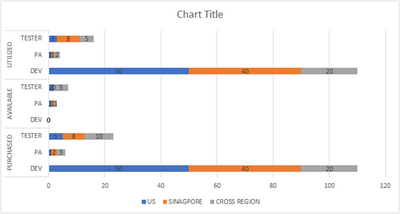
I am looking to see if anyone can help us do the below. I have created a chart in excel as aatached and I want same visual in Power Bi and I'm not able to create it. Please let me know how to work on this. Thank you in Advance!
| US | SINAGPORE | CROSS REGION | ||
| PURCHASED | DEV | 50 | 40 | 20 |
| PA | 1 | 2 | 3 | |
| TESTER | 5 | 8 | 10 | |
| AVAILABLE | DEV | 0 | 0 | 0 |
| PA | 1 | 1 | 1 | |
| TESTER | 2 | 0 | 5 | |
| UTILIZED | DEV | 50 | 40 | 20 |
| PA | 1 | 1 | 2 | |
| TESTER | 3 | 8 | 5 |
Solved! Go to Solution.
@Anonymous , First two-column on row - Sort on those - Concatenate label - off
I am assuming the country is the column in the data. It should be a legend, or you need measures for each country
Concatenate Label off : https://youtu.be/QgI0vIGIOOk
Thank you for the reply and the Solution! I could able to create the visual in PowerBI!! Also one more question, is it possible to have custom Data labels or "measure name" as a Data labels along with the value?!
@Anonymous , First two-column on row - Sort on those - Concatenate label - off
I am assuming the country is the column in the data. It should be a legend, or you need measures for each country
Concatenate Label off : https://youtu.be/QgI0vIGIOOk
If you have recently started exploring Fabric, we'd love to hear how it's going. Your feedback can help with product improvements.
A new Power BI DataViz World Championship is coming this June! Don't miss out on submitting your entry.
Share feedback directly with Fabric product managers, participate in targeted research studies and influence the Fabric roadmap.
| User | Count |
|---|---|
| 57 | |
| 34 | |
| 33 | |
| 18 | |
| 16 |
| User | Count |
|---|---|
| 67 | |
| 65 | |
| 44 | |
| 30 | |
| 28 |