
cancel
Showing results for 
Search instead for 
Did you mean: 

The Power BI Data Visualization World Championships is back! Get ahead of the game and start preparing now! Learn more

Reply
Anonymous
Not applicable

undefined

Hi PBI Experts, 
I am a new learner of Power Bi, but have a query with which I need Help.

I am trying to achieve conditional formatting on data with heirarchy, but not able to get desired solutions. 
just briefing you about the hierarchy of data : Lets say, I have a column called Product which has all the products listed. So my hierarchy goes like
Product --> SubCategory_1 --> SubCategory_2 --> Subcategory3.

Now in my report, I need Product as column header and SubCategory_1 as its value (I have used matrix to achieve this).
I need to apply conditionally formatting on Subcategory_1 values based on statues of SubCategory_1 and SubCategory_3.

Ravisha_1-1631117628000.png


I have created a new column where i am calculating the logic using IF-THEN_ELSE statment. 
the issue is that if-else statment is giving me 2 different output due to hierarchical data.

Can someone please help me with this issue. Any immediate help is appreciable. Matrix. Conditional format. 

Thank you in advance.


1 ACCEPTED SOLUTION
Anonymous
Not applicable

Hi All, 
I have now changed the logic into 2 different measures and with the help of Button and Bookmark i was able to meet my requirment. 
so closing this thread and Thank you all for your help.


Regards,

Ravisha

View solution in original post

5 REPLIES 5
Anonymous
Not applicable

Hi All, 
I have now changed the logic into 2 different measures and with the help of Button and Bookmark i was able to meet my requirment. 
so closing this thread and Thank you all for your help.


Regards,

Ravisha

Anonymous
Not applicable

Hi @Anonymous ,


Could you tell me if @sm_talha 's post helps you a little? If it is, kindly Accept it as the solution to make the thread closed. More people will benefit from it.Hope to hear from you‌‌


Best Regards,
Eyelyn Qin

Anonymous
Not applicable

Hi @Anonymous ,


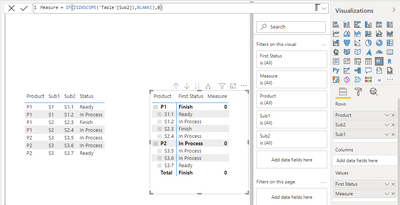
You may try ISINSCOPE() to change the first hierarchy:

Measure = IF(ISINSCOPE('Table'[Sub2]),BLANK(),0)

Eyelyn9_0-1631513033439.png

Please provide me with more details about your table and your problem or share me with your pbix file after removing sensitive data.


Best Regards,
Eyelyn Qin
If this post helps, then please consider Accept it as the solution to help the other members find it more quickly.

Anonymous
Not applicable

Hi ,
Thanks for responding.
I tried using Switch statment too but It is giving me 2 different output. 

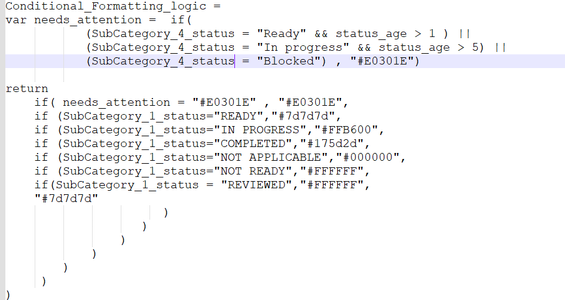
Let me show you my IF-else logic - 

Ravisha_0-1631199895753.png


I tried the same with SWITCH statment, but that gave me same outcome.

Please suggest. Matrix. Conditional format. 


mh2587
Super User
Super User

https://radacad.com/write-conditional-statement-using-switch-in-dax-and-power-bi

follow the link and make measure like in url then apply to the desired coulumn in conditional formatting using field value


Did I answer your question? If so, please mark my post as a solution!


Proud to be a Super User!


LinkedIn Icon
Muhammad Hasnain


Helpful resources

Announcements
Power BI DataViz World Championships

Power BI Dataviz World Championships

The Power BI Data Visualization World Championships is back! Get ahead of the game and start preparing now!

December 2025 Power BI Update Carousel

Power BI Monthly Update - December 2025

Check out the December 2025 Power BI Holiday Recap!

FabCon Atlanta 2026 carousel

FabCon Atlanta 2026

Join us at FabCon Atlanta, March 16-20, for the ultimate Fabric, Power BI, AI and SQL community-led event. Save $200 with code FABCOMM.

Top Solution Authors